










































Sandisk NAS 800 1.92TB SSD Review: Endurance at a premium

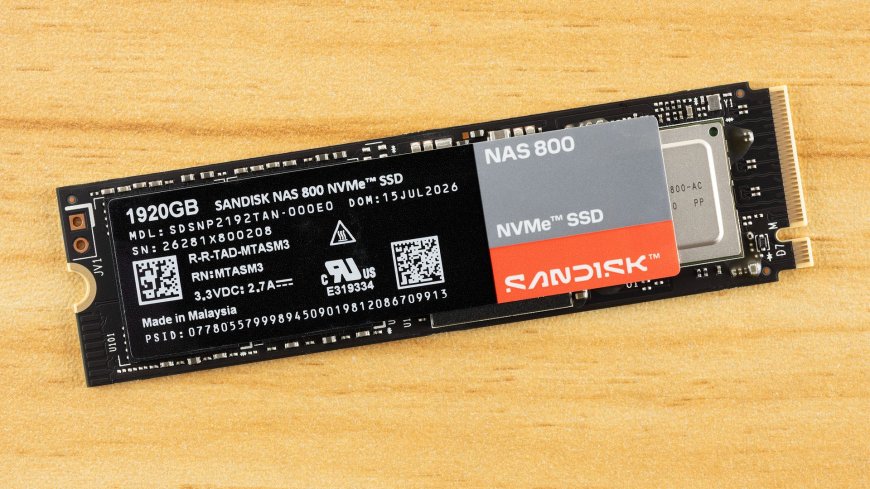
Sandisk is back with another welcome SSD, the NAS 800. As the name implies, this drive is designed for NAS appliances, but could also be a good choice for high-end desktop and enthusiast workstations. We recently reviewed the Optimus GX Pro 850P, a consumer drive for the PS5, so SanDisk is on a roll. The company has made it clear it wants to support the broader consumer market, as it’s even bringing back SATA SSDs in the form of the 320 and 520 series. The NAS 800 is closer in theme to the WD Red series of drives, like the WD Red SN700, which are optimized for home and small-business servers.
At its heart, the NAS 800 is a specialized, optimized Sandisk Optimus GX Pro 8100 (formerly the WD Black SN8100). That progenitor is one of the best drives on the market. It has a stellar controller and excellent all-around flash with good power efficiency and low latency. This makes a great base for a NAS drive, although some changes are necessary. The bones are good, though, and this drive could be used in any system. The only real issue is that you’re paying a premium for the NAS optimizations, and that’s where our focus is.
Sandisk NAS 800 Specifications
Product | 960GB | 1.92TB | 3.84TB | 7.68TB |
|---|---|---|---|---|
Pricing | ||||
Form Factor | M.2 2280-S3-M | M.2 2280-S3-M | M.2 2280-S3-M | M.2 2280-D5-M |
Interface / Protocol | PCIe 5.0 x4 / NVMe 2.0 | PCIe 5.0 x4 / NVMe 2.0 | PCIe 5.0 x4 / NVMe 2.0 | PCIe 5.0 x4 / NVMe 2.0 |
Controller | SMI SM2508 | SMI SM2508 | SMI SM2508 | SMI SM2508 |
DRAM | Yes | Yes | Yes | Yes |
Memory | Sandisk TLC 3D CBA NAND | Sandisk TLC 3D CBA NAND | Sandisk TLC 3D CBA NAND | Sandisk TLC 3D CBA NAND |
Sequential Read | 14,900 MB/s | 14,900 MB/s | 14,900 MB/s | 14,900 MB/s |
Sequential Write | 11,000 MB/s | 13,200 MB/s | 13,100 MB/s | 13,000 MB/s |
Random Read | 1,600K | 2,300K | 2,300K | 2,200K |
Random Write | 800K | 1,500K | 2,000K | 2,100K |
Security | TCG Opal | TCG Opal | TCG Opal | TCG Opal |
Endurance (TBW) | 1,750TB | 3,500TB | 7,000TB | 14,000TB |
Part Number | SDSNP2960GAN-000E0 | SDSNP2192TAN-000E0 | SDSNP2384TAN-000E0 | SDSNP2768TAN-000E0 |
Height | Not specified | Not specified | Not specified | Not specified |
Warranty | 5-Year | 5-Year | 5-Year | 5-Year |
The Sandisk NAS 800 has some strange capacities, at least compared to consumer offerings, because the drives reserve more spare flash as overprovisioning, which improves endurance. The drive comes in 960GB, 1.92TB, 3.84TB, and 7.68TB flavors. The final one is the most welcome, as it’s been difficult to find larger drives outside of enterprise. Performance is excellent, at up to 14,900 / 13,200 MB/s for sequential reads and writes and up to 2,300K / 2,100K random read and write IOPS. Peak overall performance should be achieved at 3.84TB.
Write endurance is where this drive really stands out. It’s rated for up to 14PBW at its maximum capacity. Proportional to size, this puts it at almost three times the normal for consumer drives. The drive also supports TCG Opal self-encryption for data at rest, as would be expected for a drive in this class. Things are capped off with a standard five-year warranty.
You pay for this performance and endurance. At the time of writing,SanDisk’ss store lists the four capacities at $387.99, $699.99, $1,374.99, and $2,749.99. That’s roughly 45% to 65% more than the WD Black SN8100’s current street prices. Against the same drive under its new Optimus GX Pro 8100 name, the premium is between 27% and 29% at the time of review. The extra cost comes partly from the drive’s optimization but mostly from its TBW rating. You’re getting about one drive write per day over the five-year warranty, which is all but required for a drive of this type, and worthy of the price tag if you’re focused on endurance.
Sandisk NAS 800 Software and Accessories
If you own a Sandisk drive, or a WD drive for that matter, then you should be no stranger to the NAS 800’s software offerings. Sandisk has its own dashboard, aptly named Sandisk Dashboard, which follows the popular WD Dashboard. This SSD toolbox has all the information you need for your drive, including important SMART and health information. It also lets you enable optional features, find firmware updates, and more. Sandisk also provides a download for its OEM version of Acronis True Image, useful for backing up your files or cloning your drive.
Sandisk NAS 800: A Closer Look
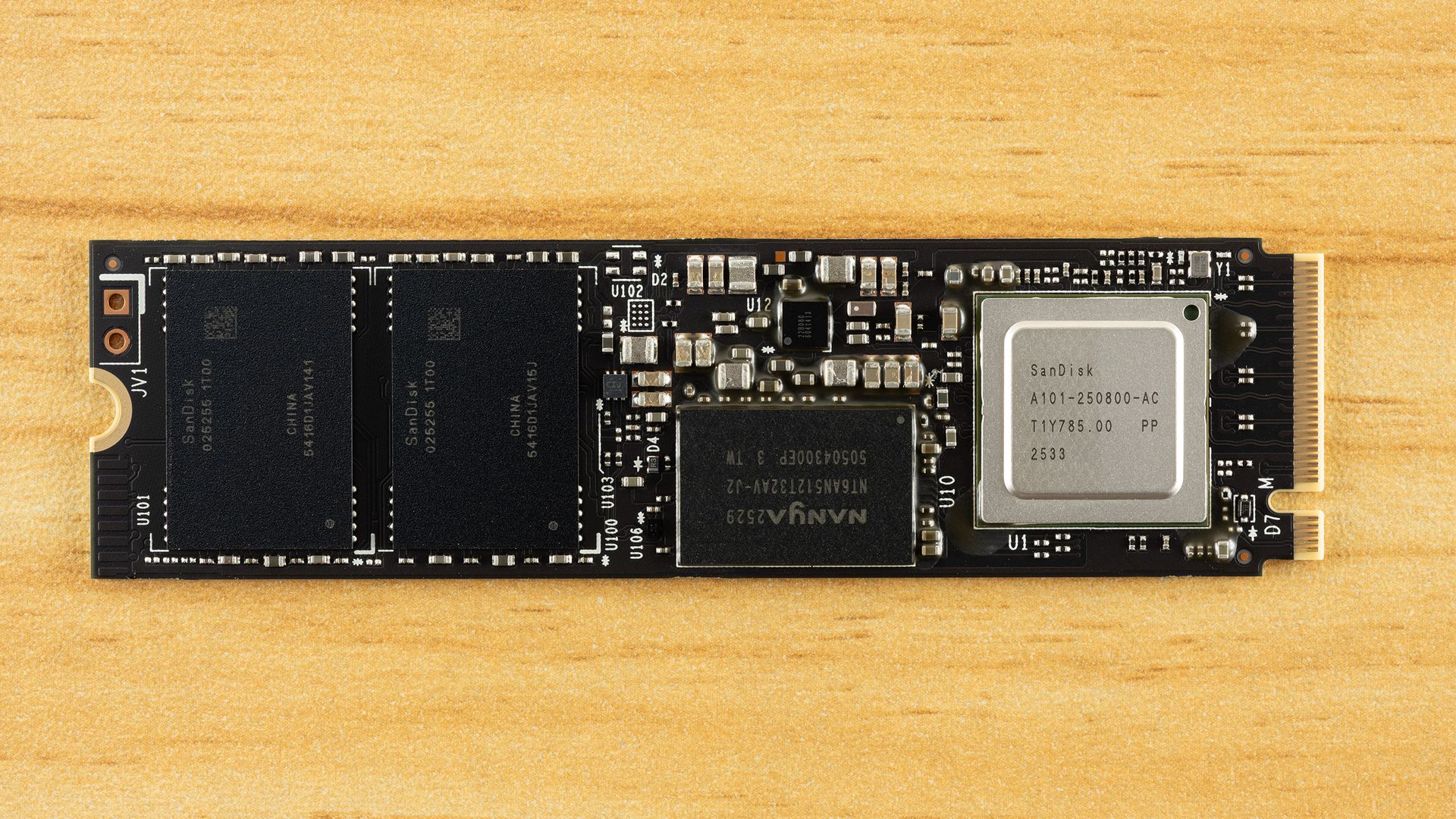
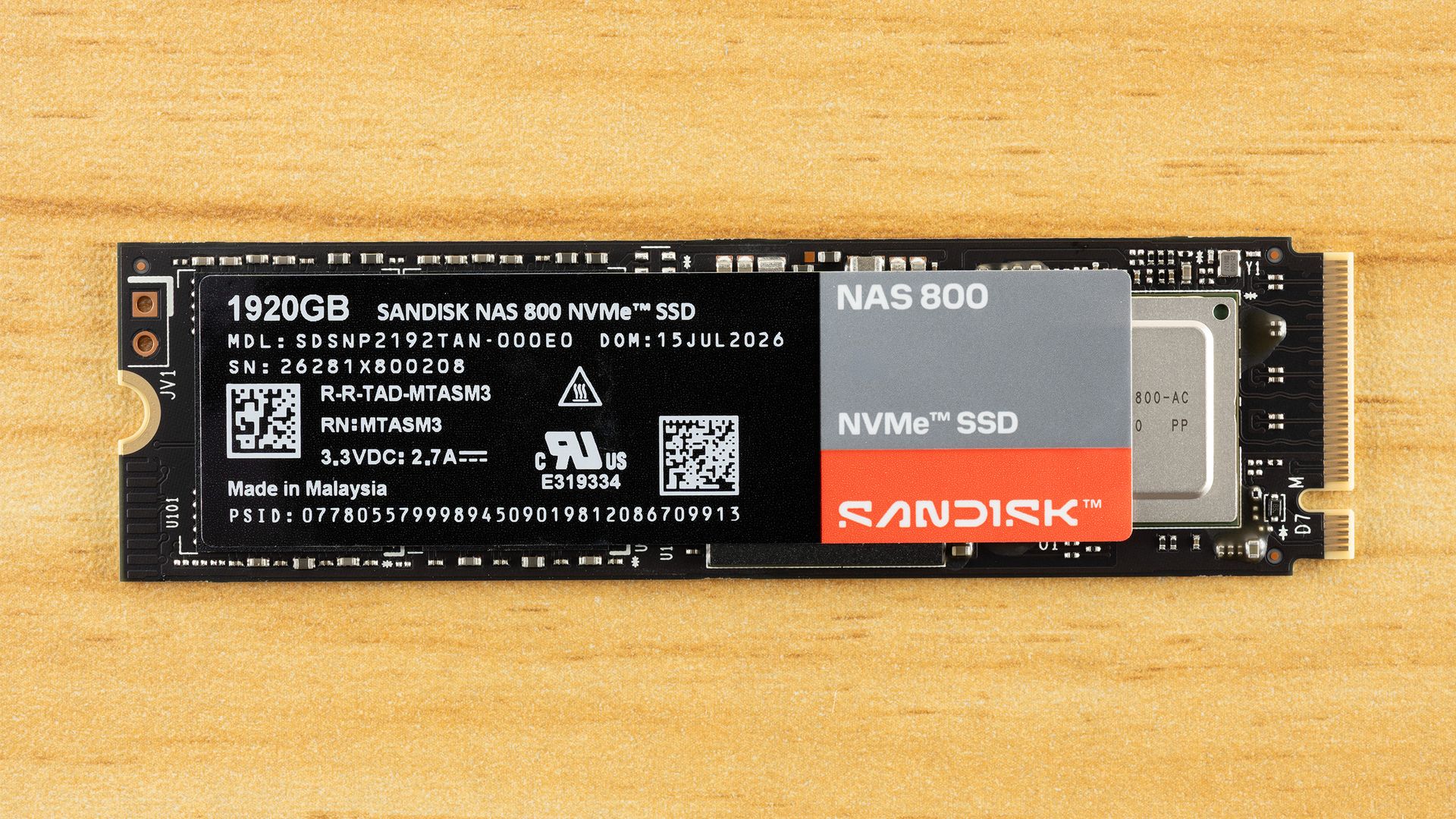
The 1,920GB, or 1.92TB, version of the NAS 800 is single-sided. That also applies to the 960GB and 3.84TB versions. Only the 7.68TB version is double-sided, although that shouldn’t generally preclude you from using it in devices that would benefit from the drive. It could make a difference for certain cooling arrangements. The drive’s rating of 3.3V / 2.7A puts it at around 9W, which is between the drive’s maximum power state of 9.50W and its 6.5W / 6.4W average draw for this capacity. The reported active draw of 7.52W is higher than this average, but given that this drive is NAS-optimized with a small pseudo-SLC (pSLC) cache, it will likely be lower in practice. The drive should run cooler as a result.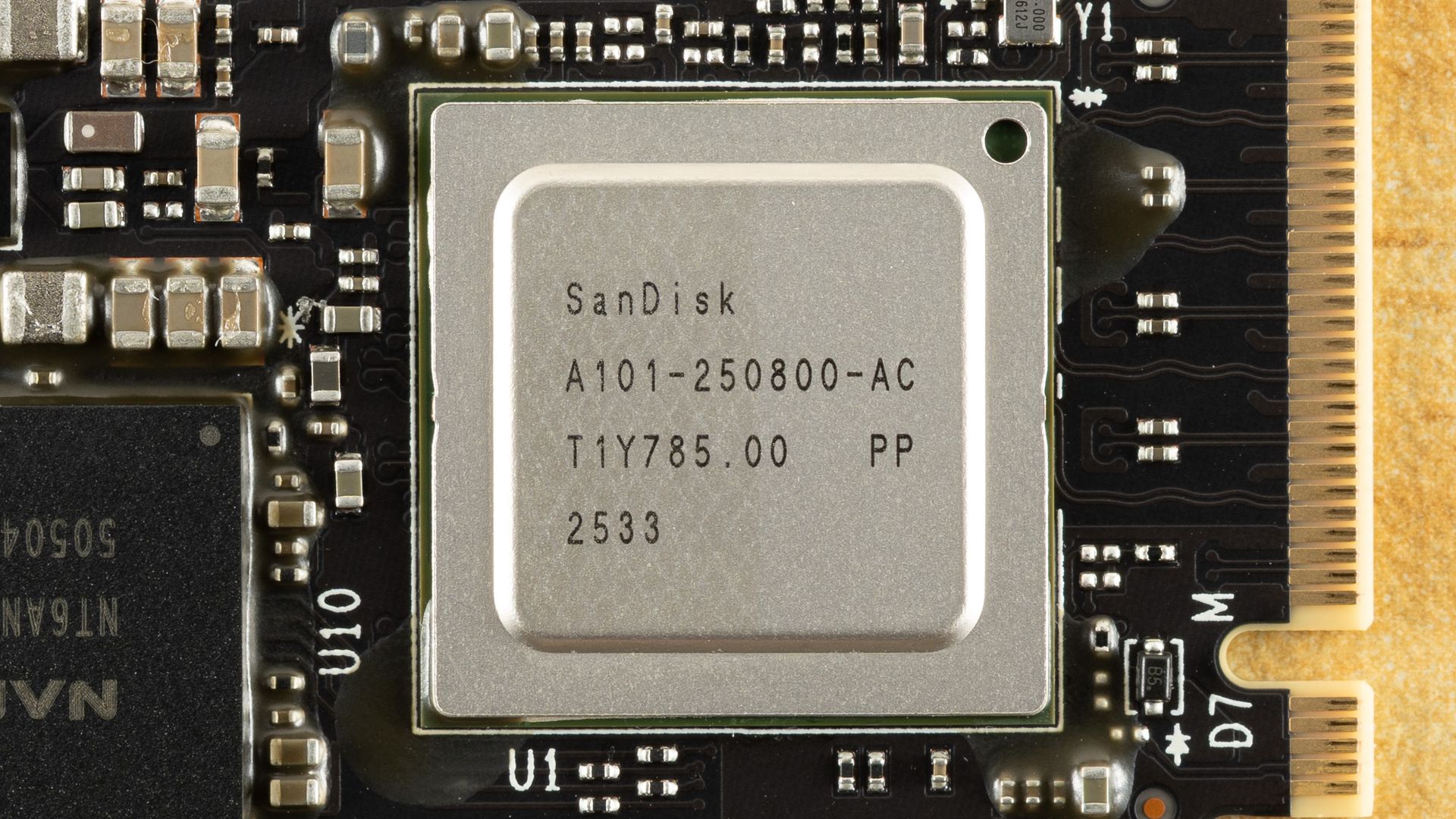
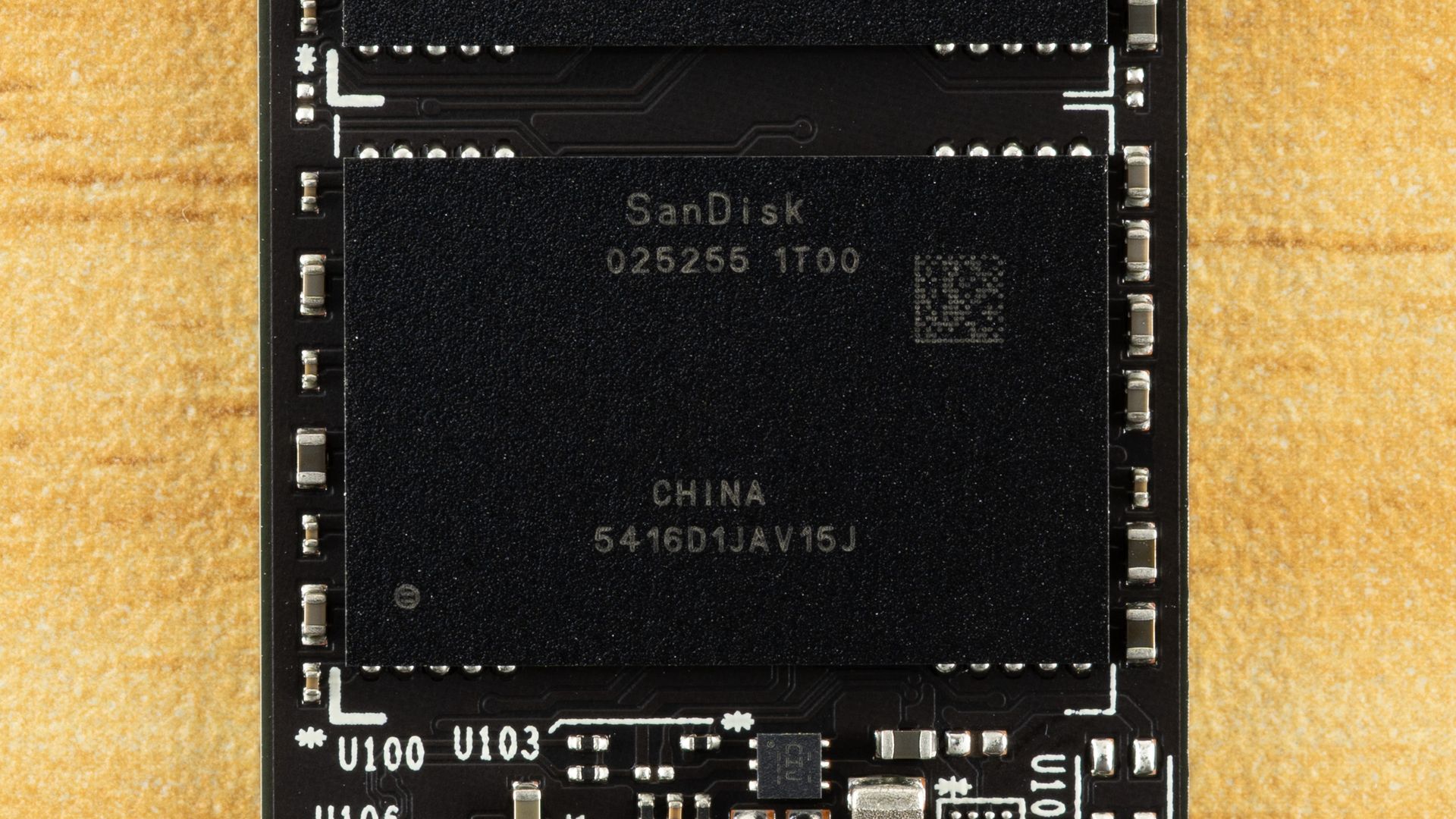
The drive layout includes the SSD controller, a DRAM package, and two NAND flash packages. The 7.68TB version will need more packages on the rear, for a total of four flash packages. The controller is labeled in a way similar to SanDisk’s proprietary parts, but the “250800” spells out that this is a Silicon Motion, or SMI, SM2508. This is an eight-channel, high-end PCIe 5.0 SSD controller with generally excellent performance and power efficiency.
The DRAM package is LPDDR4 and is therefore a more power-efficient choice. It’s also 2GB, which follows the normal 1:1,000 ratio of DRAM to NAND. Our recent Optimus GX Pro 850P review had a 2TB drive from Sandisk with only 1GB of RAM. That’s perfectly suitable for gaming use. For this NAS drive, 2GB is very much preferred. The controller and DRAM are paired with SanDisk’s 218-layer BiCS8 TLC flash. This is some of the best flash on the market, with good all-around performance, very good latency, and very good power efficiency. This is world-class hardware, and the price reflects that.
MORE: Best SSDs
MORE: Best External SSDs
MORE: Best SSD for the Steam Deck
Comparison Products
The Sandisk NAS 800 technically has little competition in this market. We do have the Gen 4 Addlink NAS D60 with power-loss protection, but it’s otherwise pretty thin, particularly for Gen 5. The closest non-NAS retail drive in Gen 4 is the WD Black SN850X. For Gen 5, we have the WD Black SN8100, which has the same hardware as the NAS 800, and the same goes for the Kingston Fury Renegade G5. The Crucial T710 and Lexar NM1090 Pro use the same controller but two different generations of Micron flash rather than Kioxia or Sandisk flash. Phison is represented by the Corsair MP700 Pro XT, while the main proprietary option here is Samsung’s 9100 Pro.
Trace Testing — 3DMark Storage Benchmark
Built for gamers, 3DMark’s Storage Benchmark focuses on real-world gaming performance. Each round in this benchmark stresses storage based on gaming activities including loading games, saving progress, installing game files, and recording gameplay video streams. Future gaming benchmarks will be DirectStorage-inclusive and an evaluation for future-proofing is included where applicable.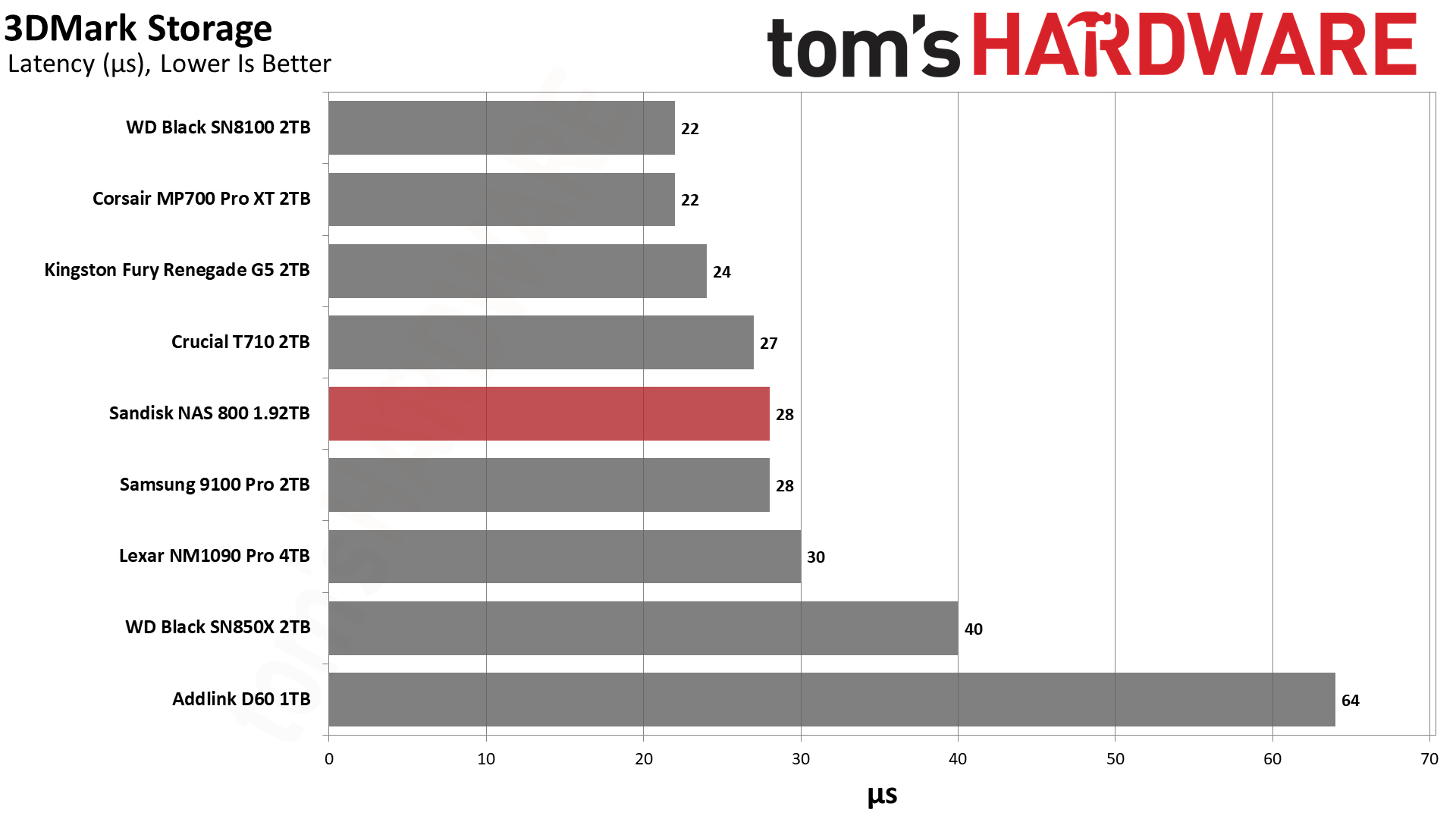
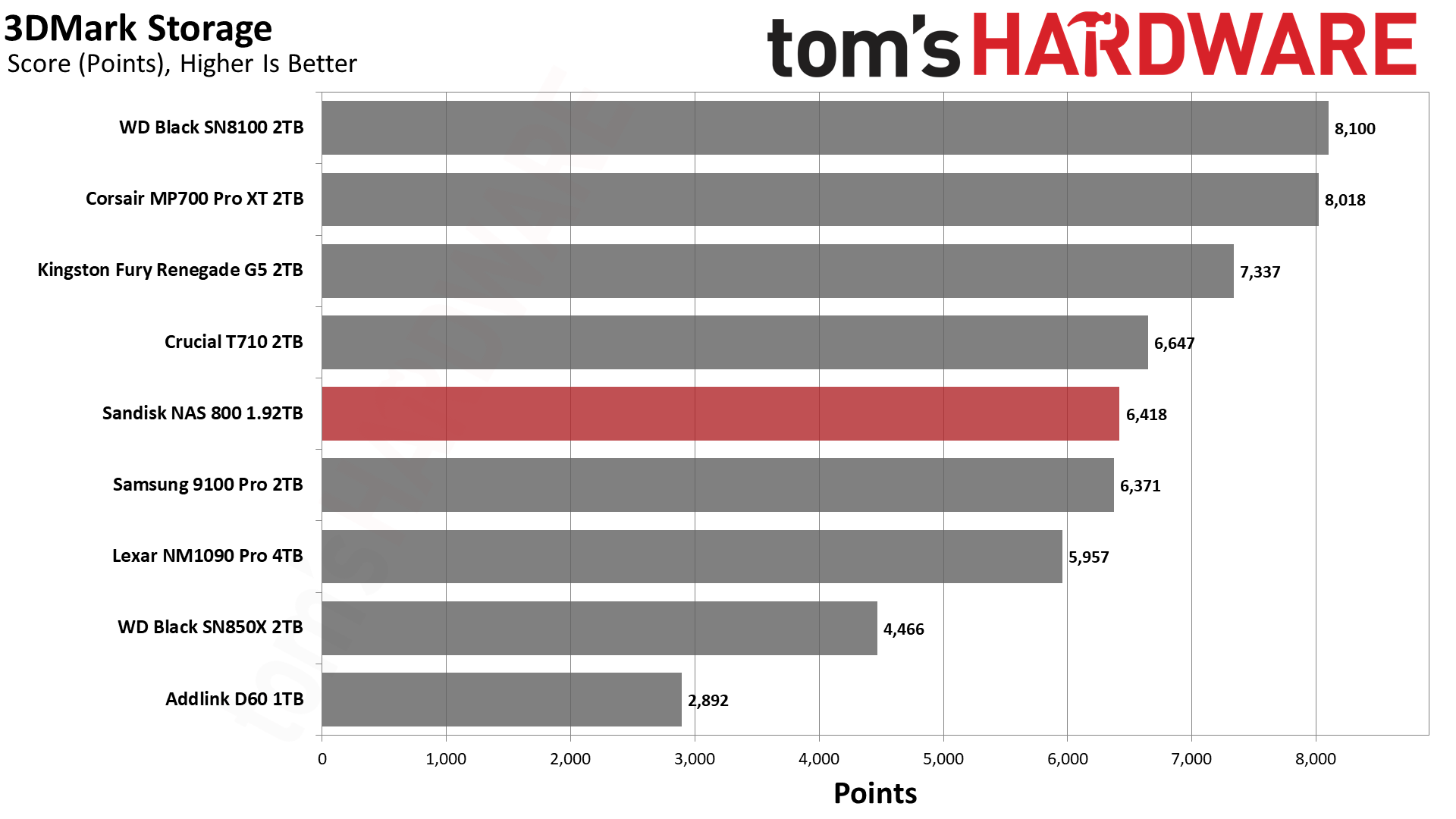
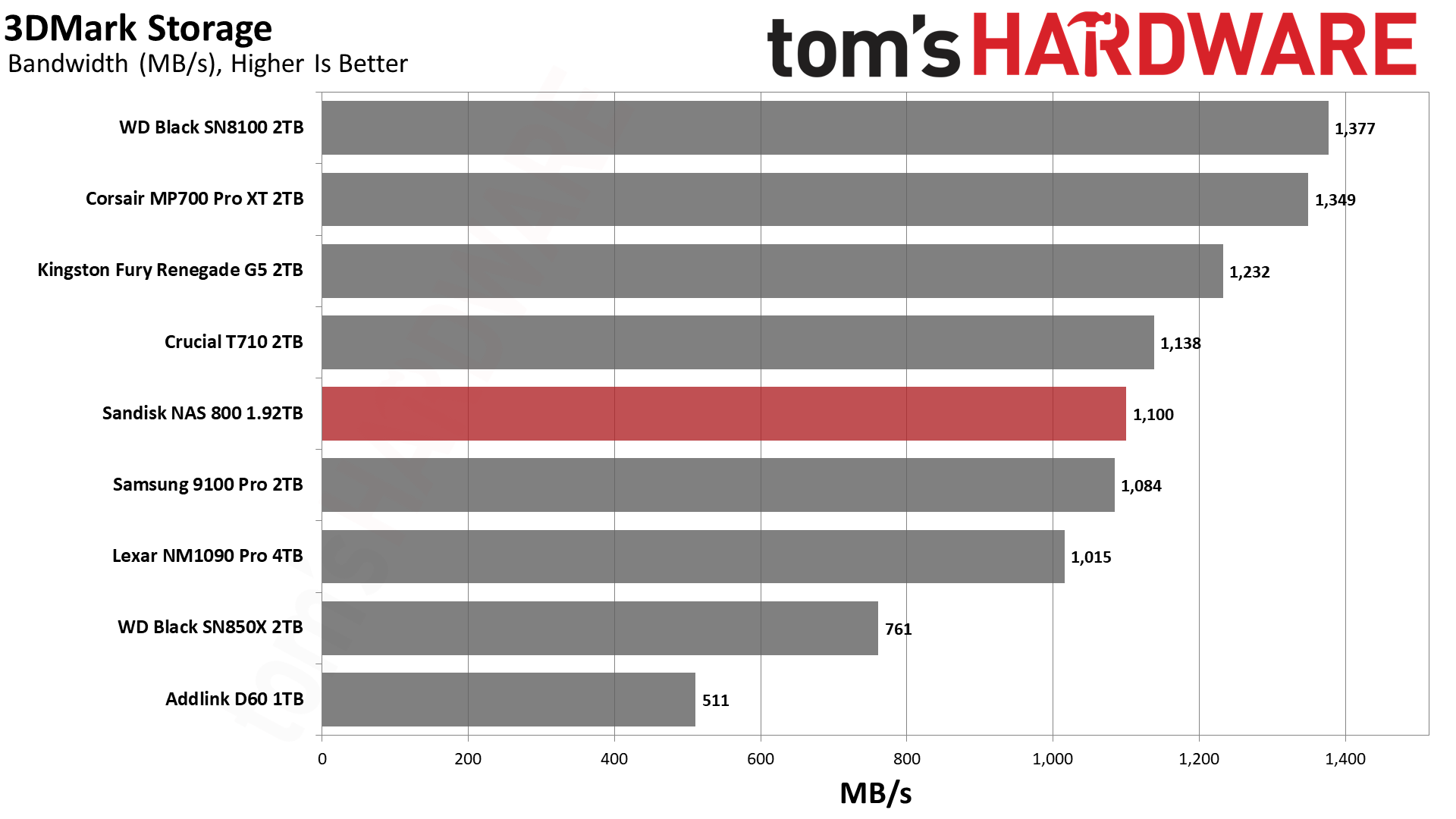
We wouldn’t normally recommend a NAS drive for gaming, but if you happen to use this drive, you would be good to go. The NAS 800’s flash is known for being low-latency, and while it doesn’t perform up to the Black SN8100’s level, it’s in the same ballpark as the T710 and 9100 Pro. The drive does not seem optimized for it, though, as it does lose quite a bit of performance against the Black SN8100, which has the same hardware. This is still more than fast enough for games. You would be plenty happy with just the Black SN850X.
Trace Testing — PCMark 10 Storage Benchmark
PCMark 10 is an industry standard trace-based benchmark that uses a wide-ranging set of real-world traces from popular applications and everyday tasks to measure the performance of storage devices. The results are particularly useful when analyzing drives for their use as primary/boot storage devices and in work environments.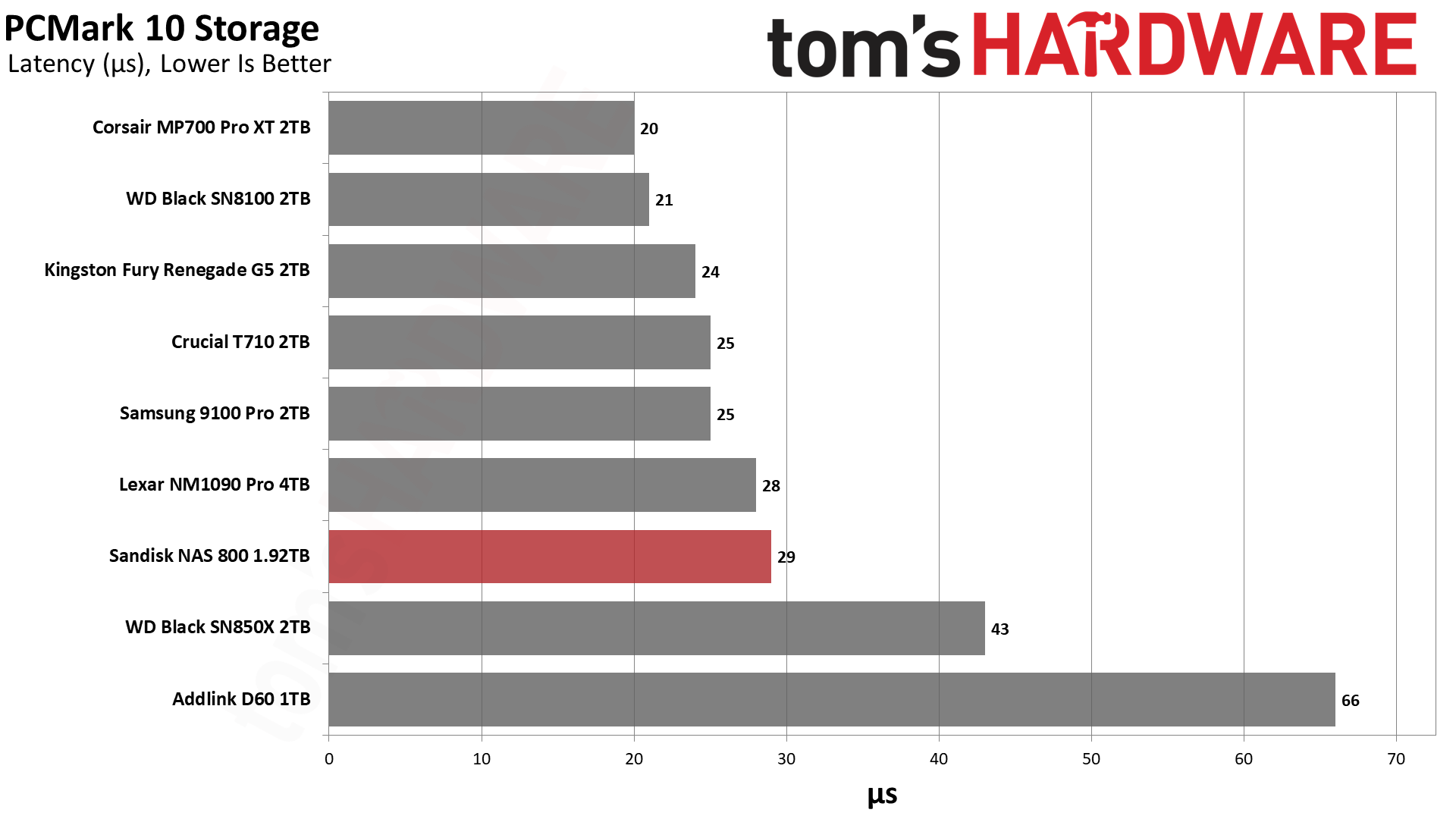
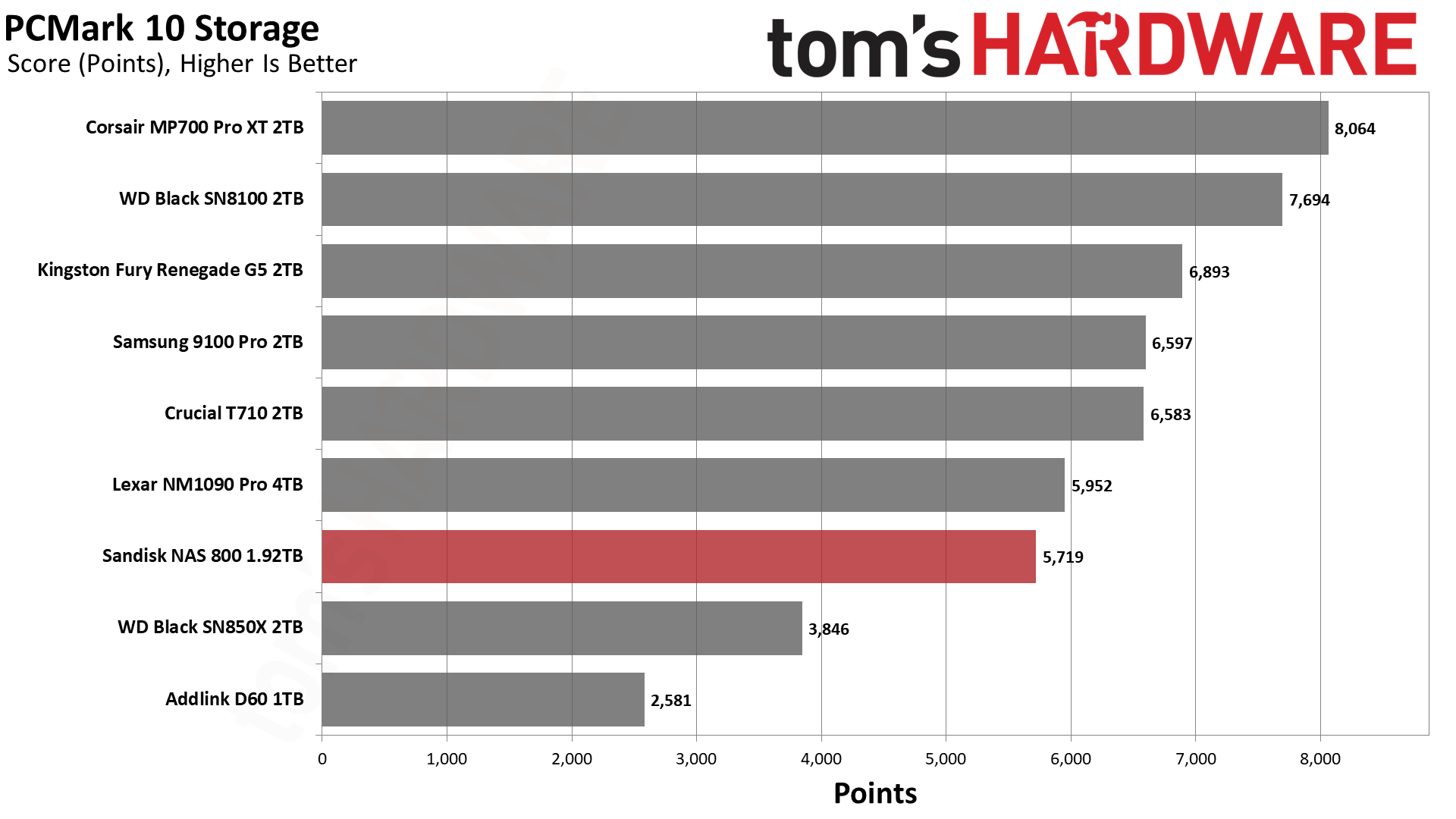
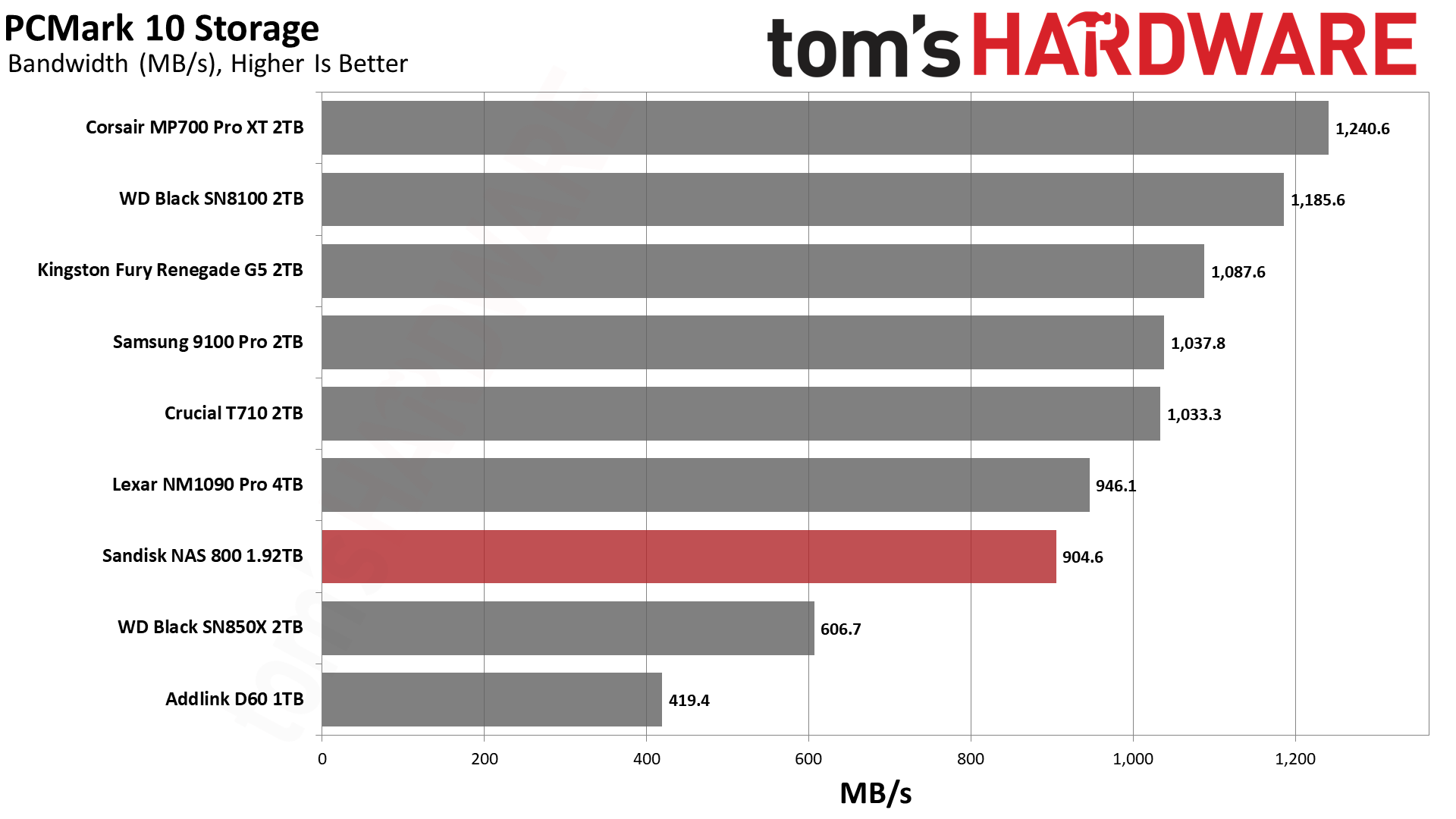
Performance is a bit weaker in PCMark 10 than in 3DMark. The NAS 800 finishes closer to the Lexar NM1090 Pro, which is not a bad drive but also not fully within the same class. We would expect it to be closer to the T710 and 9100 Pro. The Black SN8100 doesn’t shine quite as much here, either, but the NAS 800 trails it by 26%, a wider gap than the 21% in 3DMark.
This points to firmware tuning and other optimizations on the NAS 800, rather than a limitation of the shared hardware. The Phison-based MP700 Pro XT leads the pack and seems better optimized for PCMark. The NAS 800’s performance is still excellent in the grand scheme of things, though, well above Gen 4 drives. It’s just not our first choice for applications.
Console Testing — PlayStation 5 Transfers
The PlayStation 5 is capable of taking one additional PCIe 4.0 or faster SSD for extra game storage. While any 4.0 drive will technically work, Sony recommends drives that can deliver at least 5,500 MB/s of sequential read bandwidth for optimal performance. Based on our extensive testing, PCIe 5.0 SSDs don’t bring much to the table and generally shouldn’t be used in the PS5, especially as they may require additional cooling. Check our Best PS5 SSDs article for more information.
Our testing utilizes the PS5’s internal storage test and manual read/write tests with over 192GB of data both from and to the internal storage. Throttling is prevented where possible to see how each drive operates under ideal conditions. While game load times should not deviate much from drive to drive, our results can indicate which drives may be more responsive in long-term use.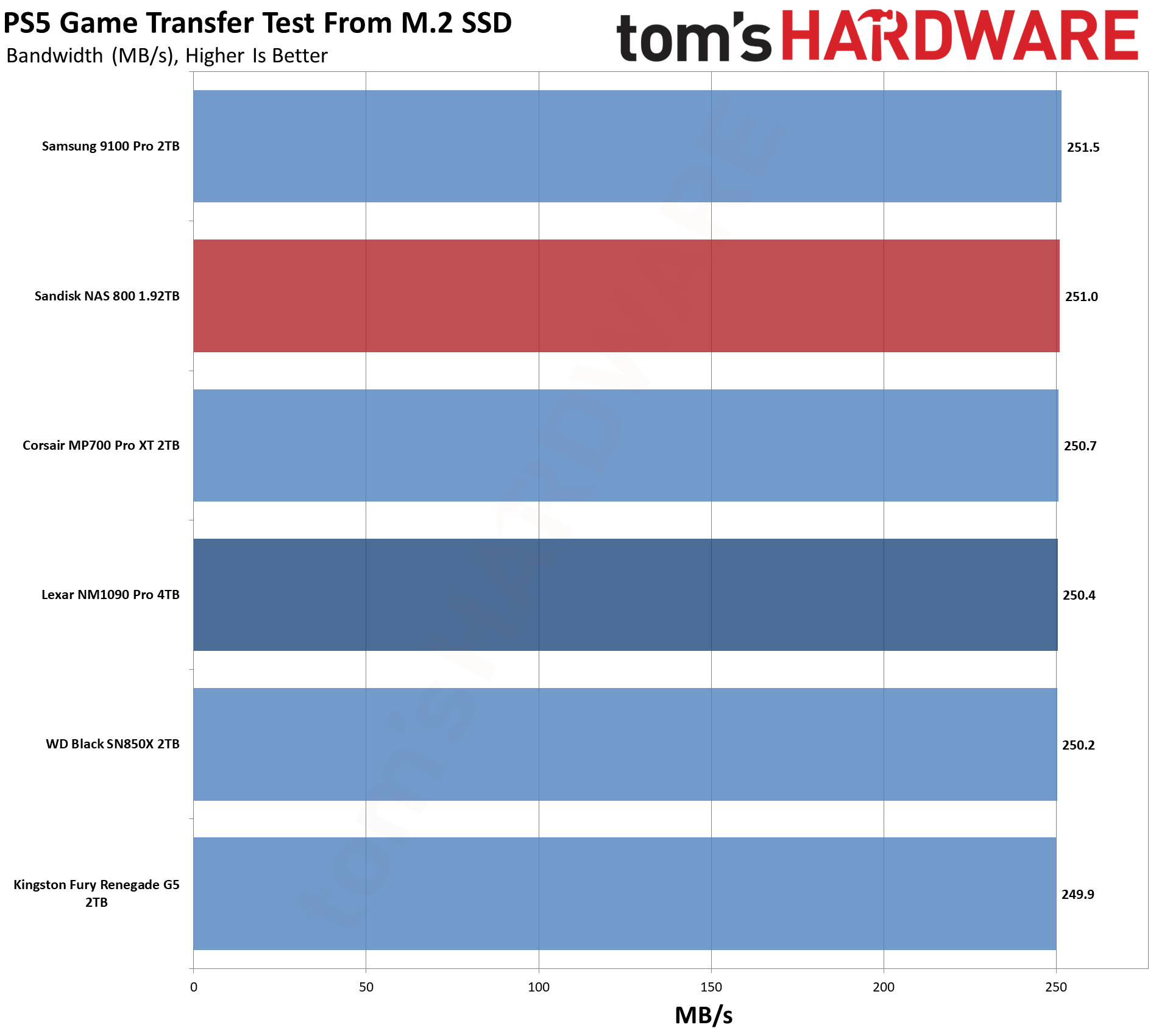
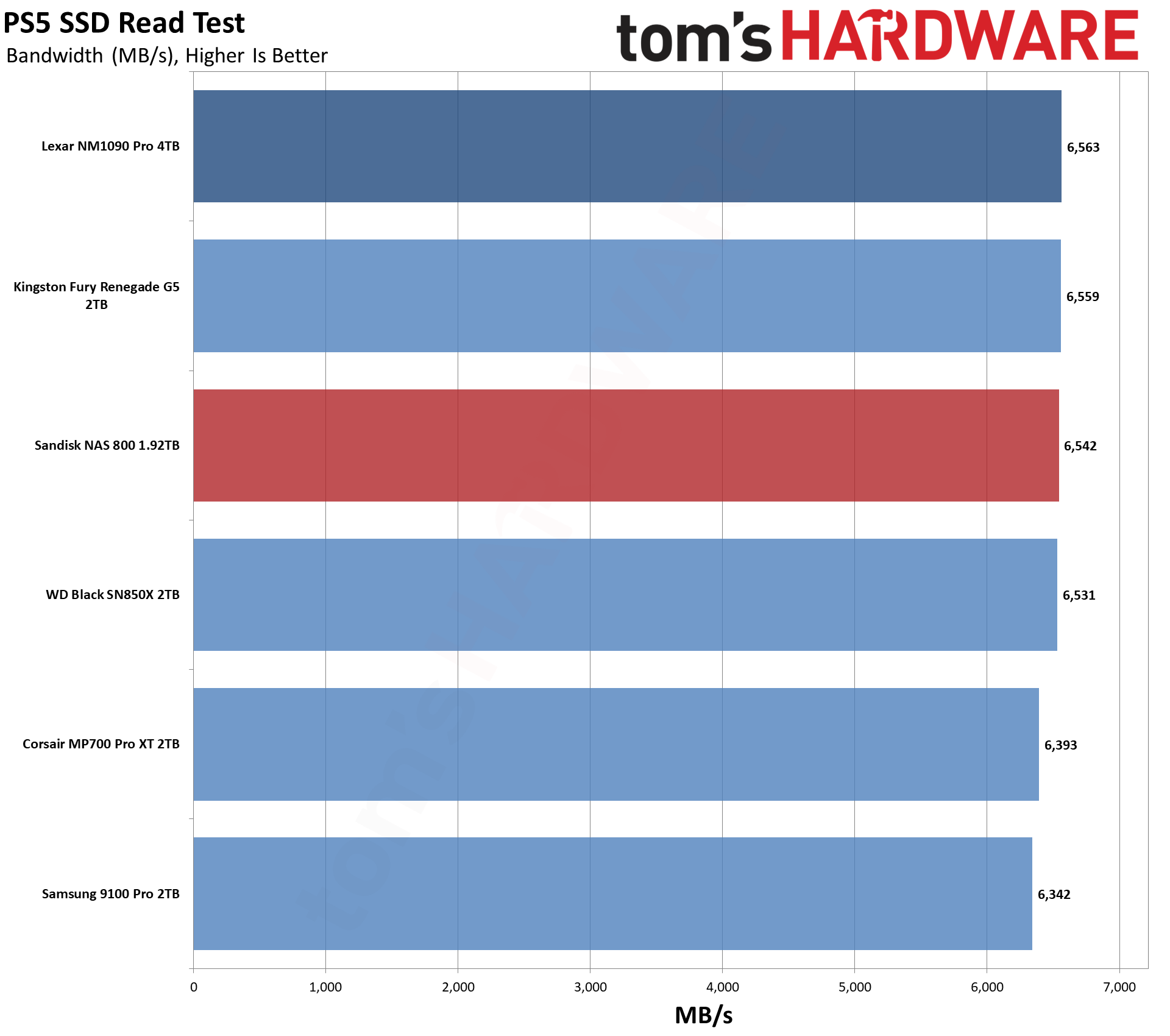
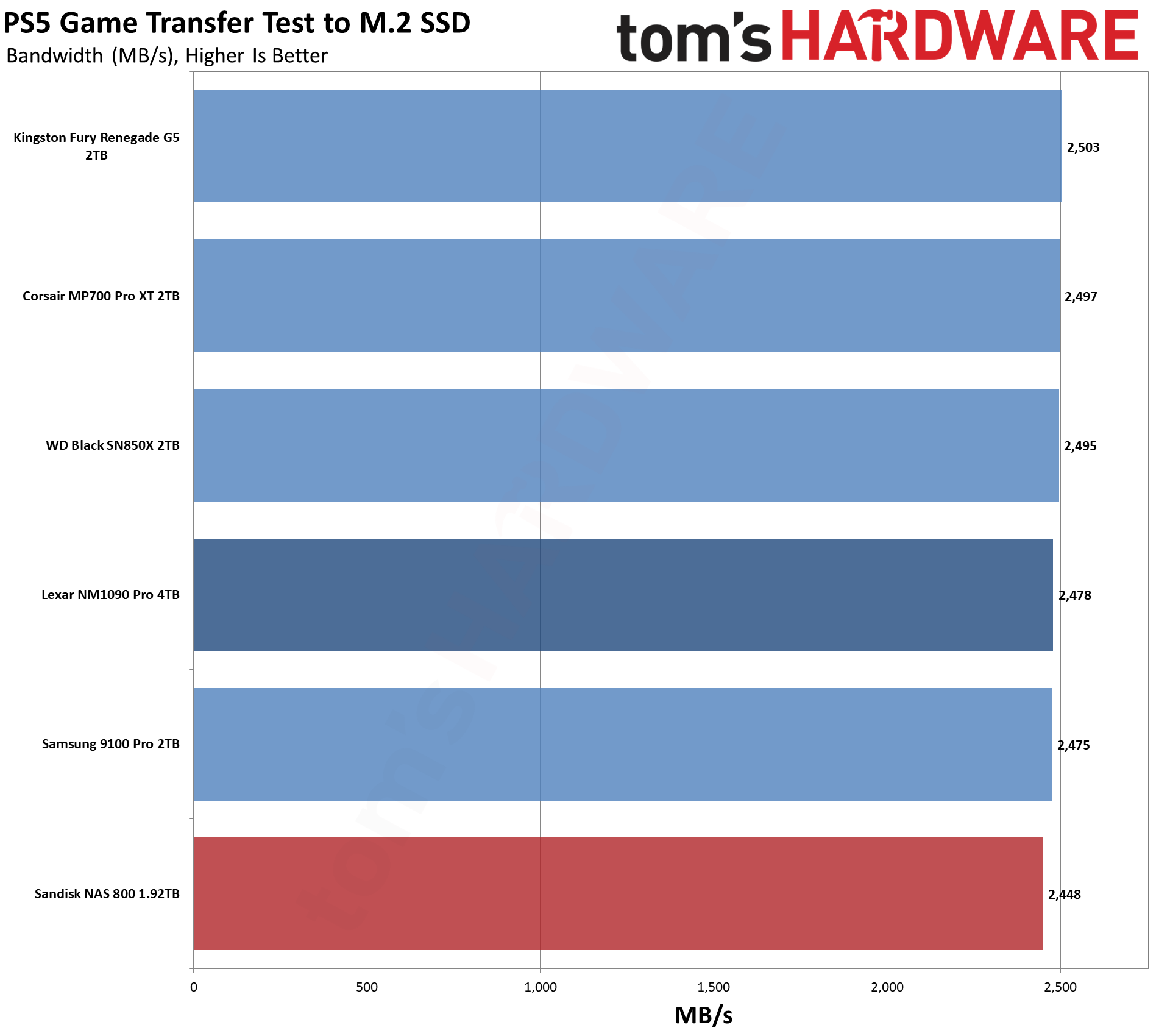
If the NAS 800 is overkill for PC gaming, it’s really overkill for PS5 gaming. Performance is pretty good, as expected, but you’re leaving a lot of its bandwidth potential on the table. The drive is also not optimized for this type of workload. However, it could work if you do a lot of writes on your PS5 and want something with extreme endurance.
Transfer Rates — DiskBench
We use the DiskBench storage benchmarking tool to test file transfer performance with a custom 50GB dataset. We write 31,227 files of various types, such as pictures, PDFs, and videos to the test drive, then make a copy of that data to a new folder, and follow up with a reading test of a newly written 6.5GB zip file. This is a real-world type workload that fits into the cache of most drives.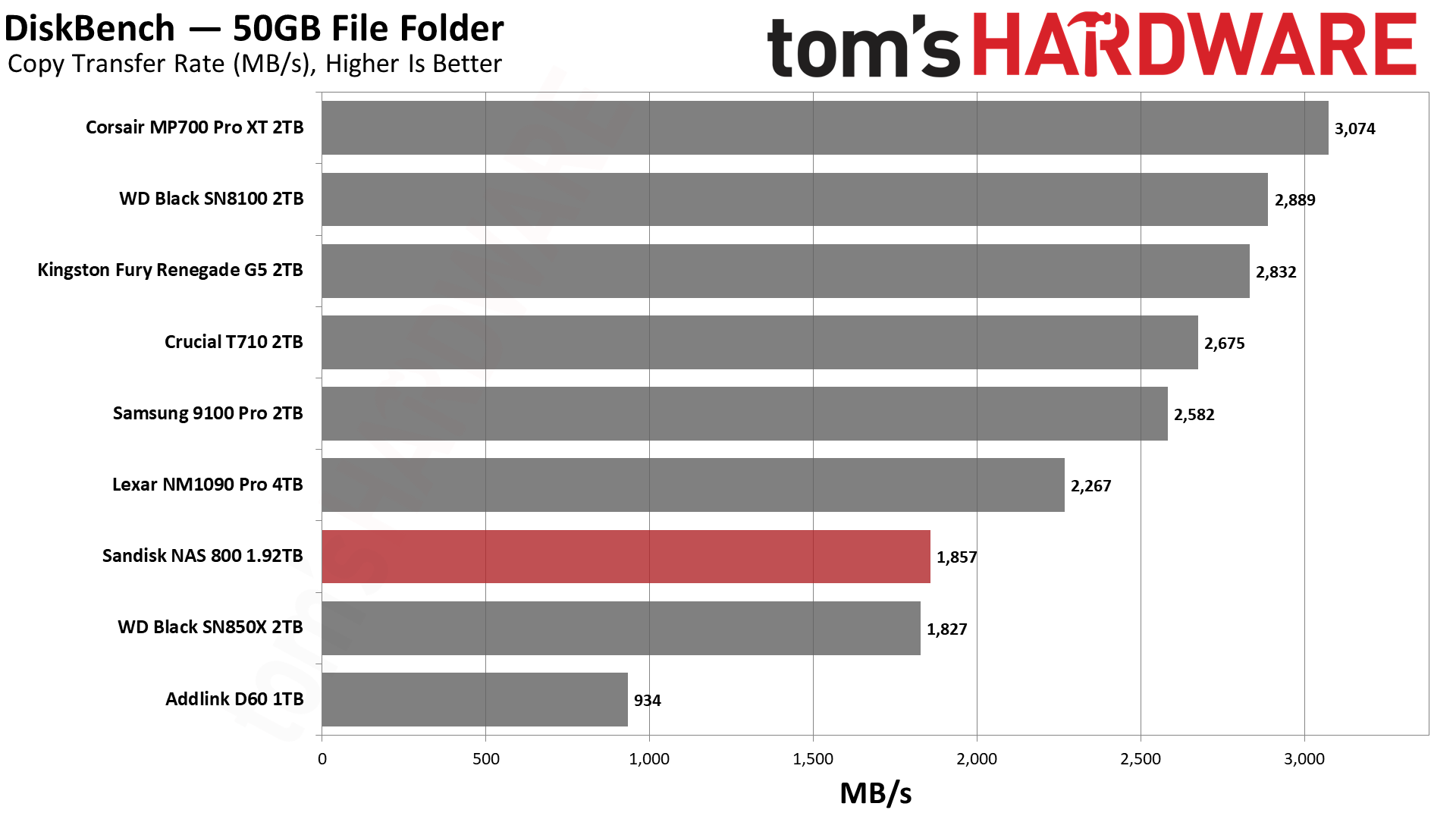
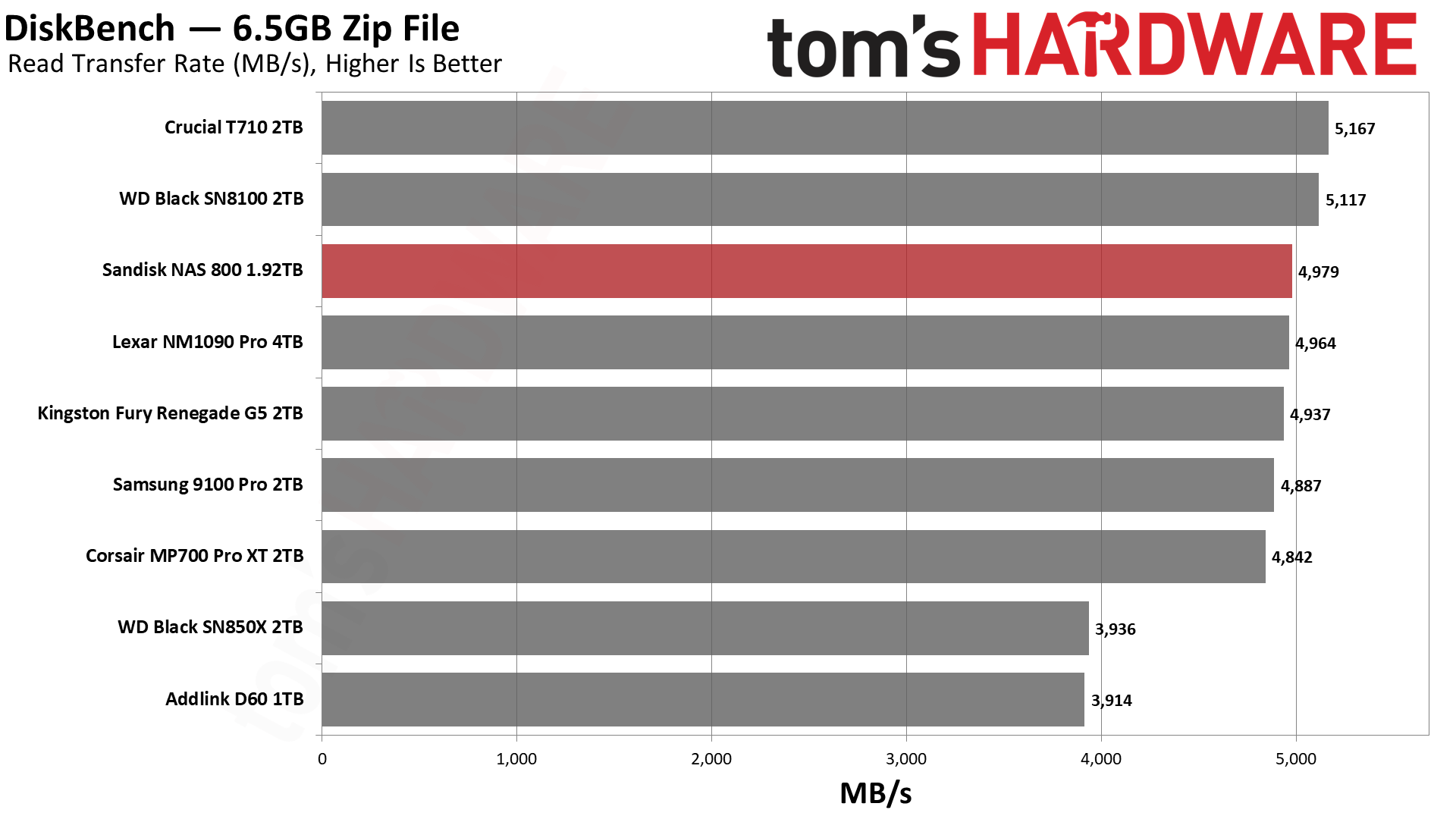
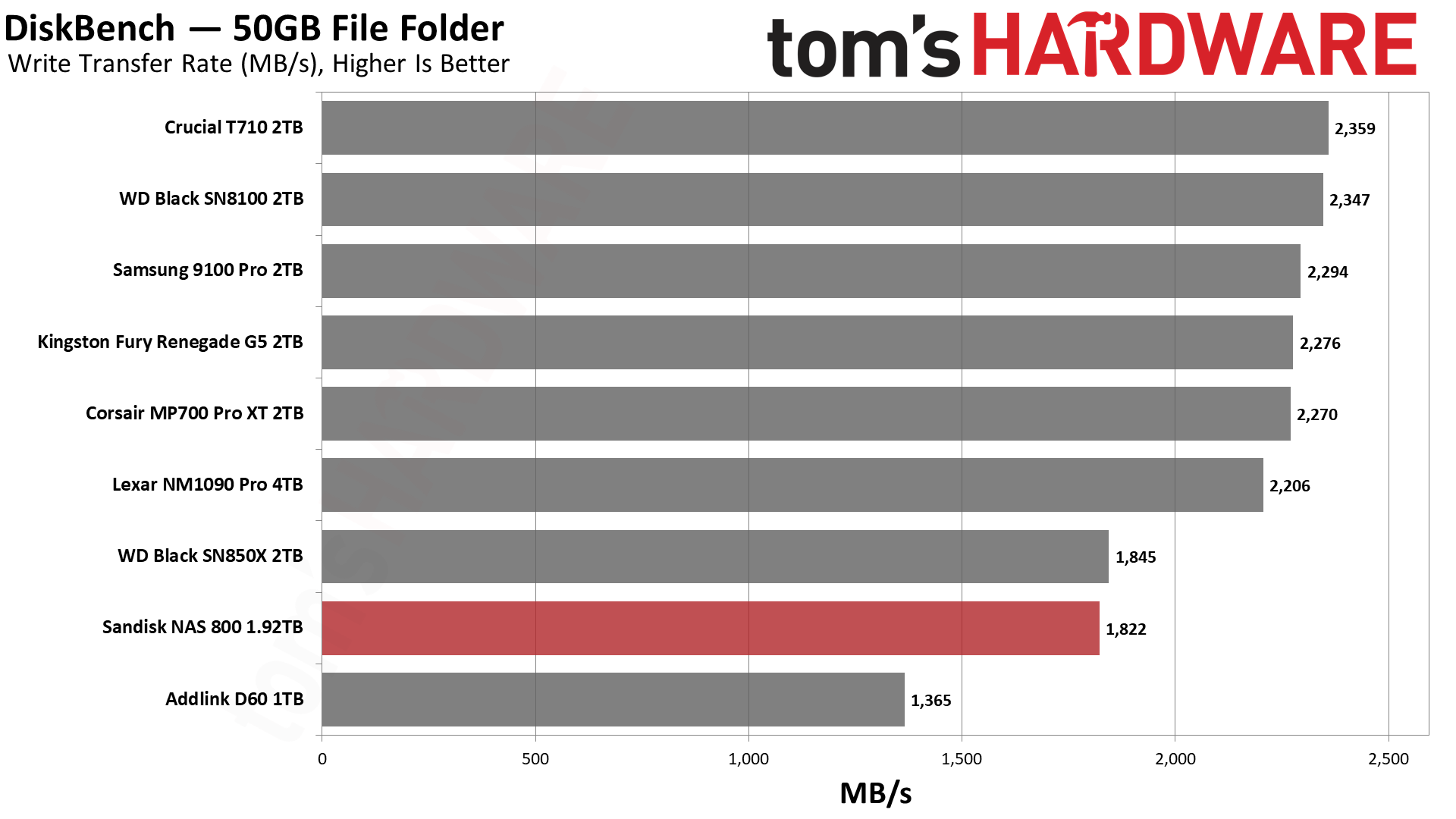
At a quick glance, the NAS 800 does well with reads but not so well with writes and copying in our DiskBench test. Obviously, having slower writes will impact copy performance. That’s the reason the drive lags here, as the test works against the NAS 800’s design. Its roughly 12GB pSLC cache can only absorb the first quarter of the 50GB write, with the rest going straight to TLC. For that reason, its write score lands about 20% below the other Gen 5 drives, with a drop of 36% for copying against the same-hardware SN8100.
Admittedly, a NAS drive should be able to tackle file copying like this. A better test to show its value would be an extremely large transfer, where its steady-state performance would win out. Also, for smaller transfers, particularly random writes, its small cache would perform well. Know your workload before picking your drive.
Synthetic Testing — ATTO / CrystalDiskMark
ATTO and CrystalDiskMark (CDM) are free and easy-to-use storage benchmarking tools that SSD vendors commonly use to assign performance specifications to their products. Both of these tools give us insight into how each device handles different file sizes and at different queue depths for both sequential and random workloads.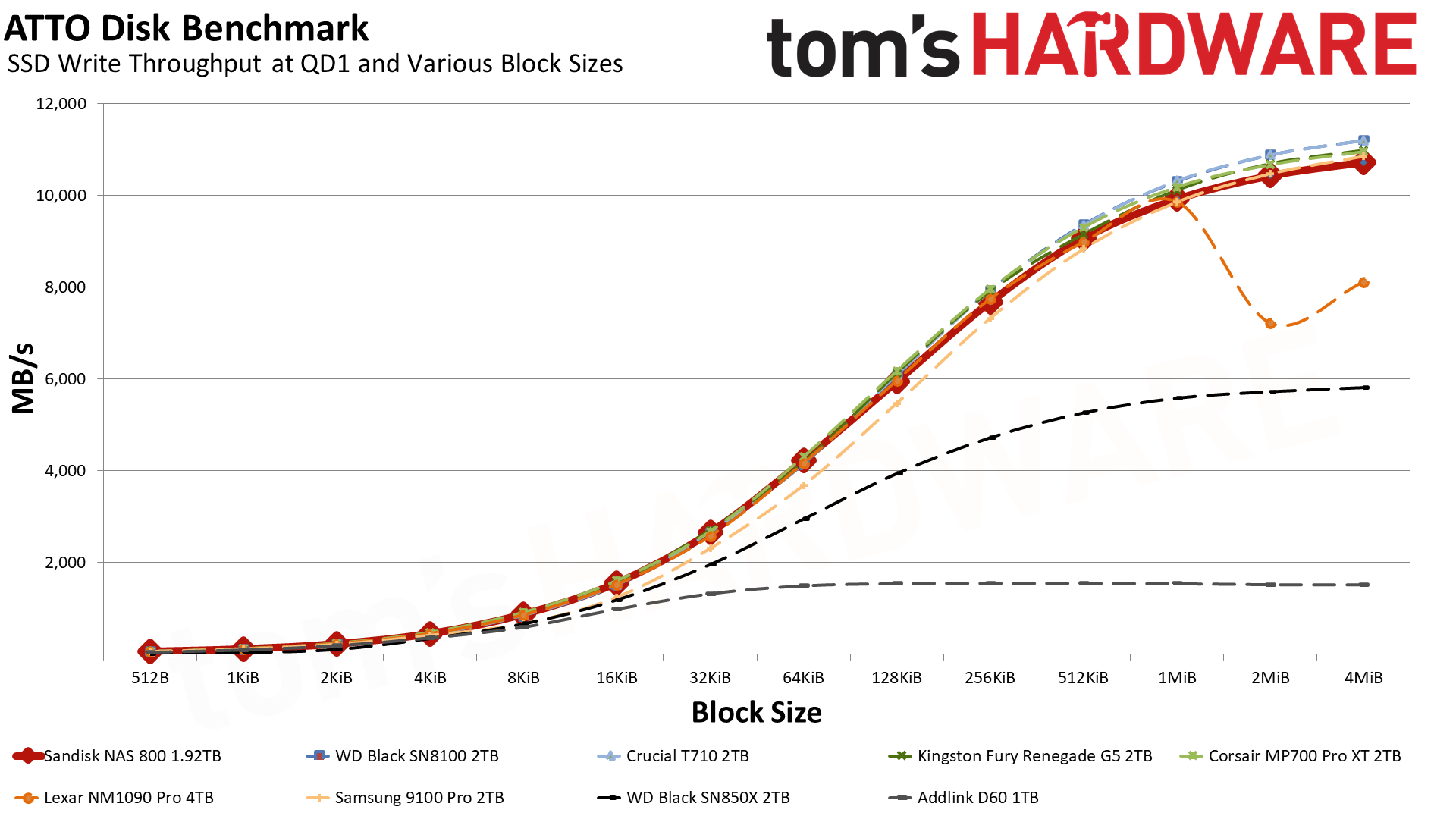
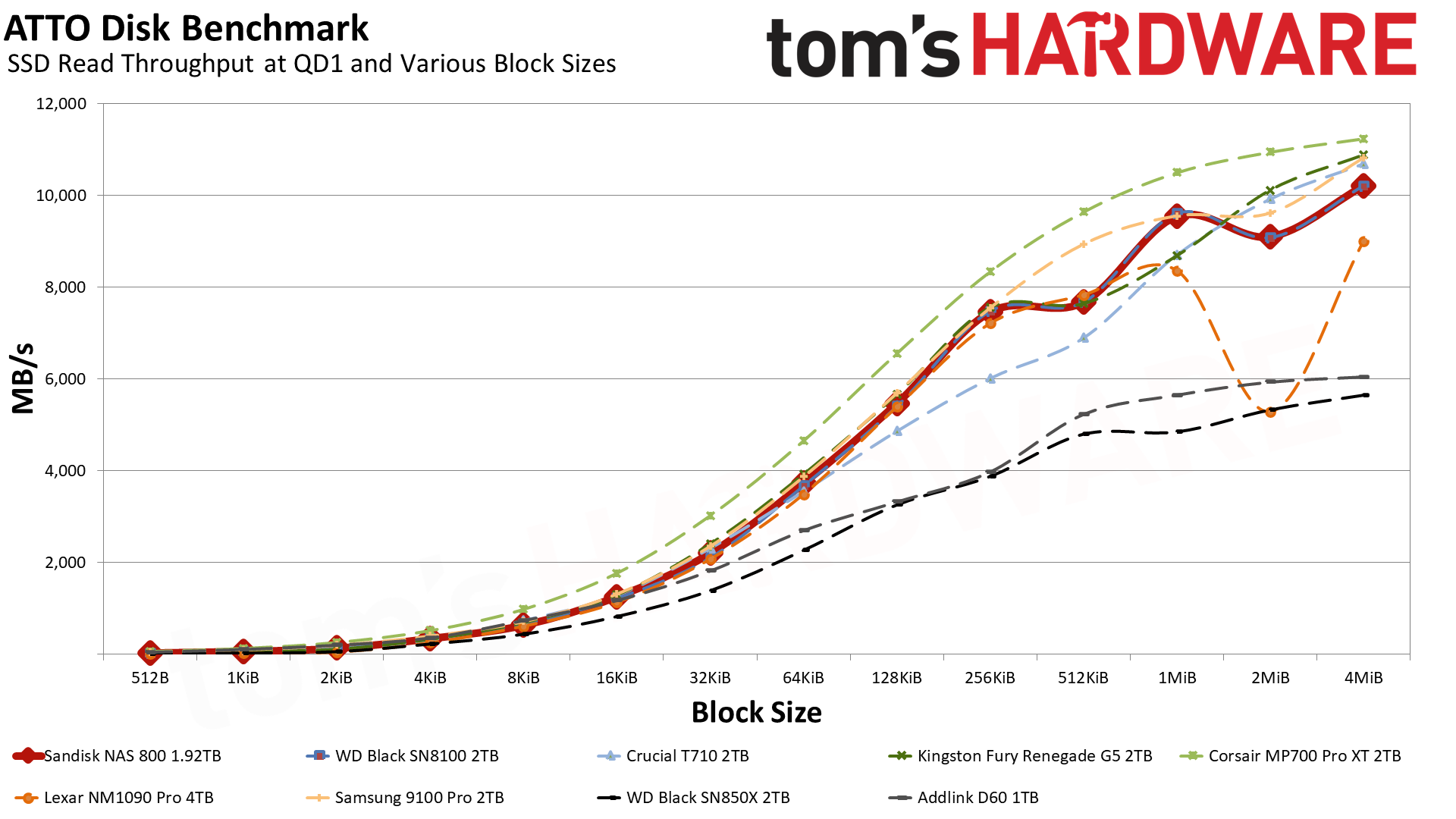
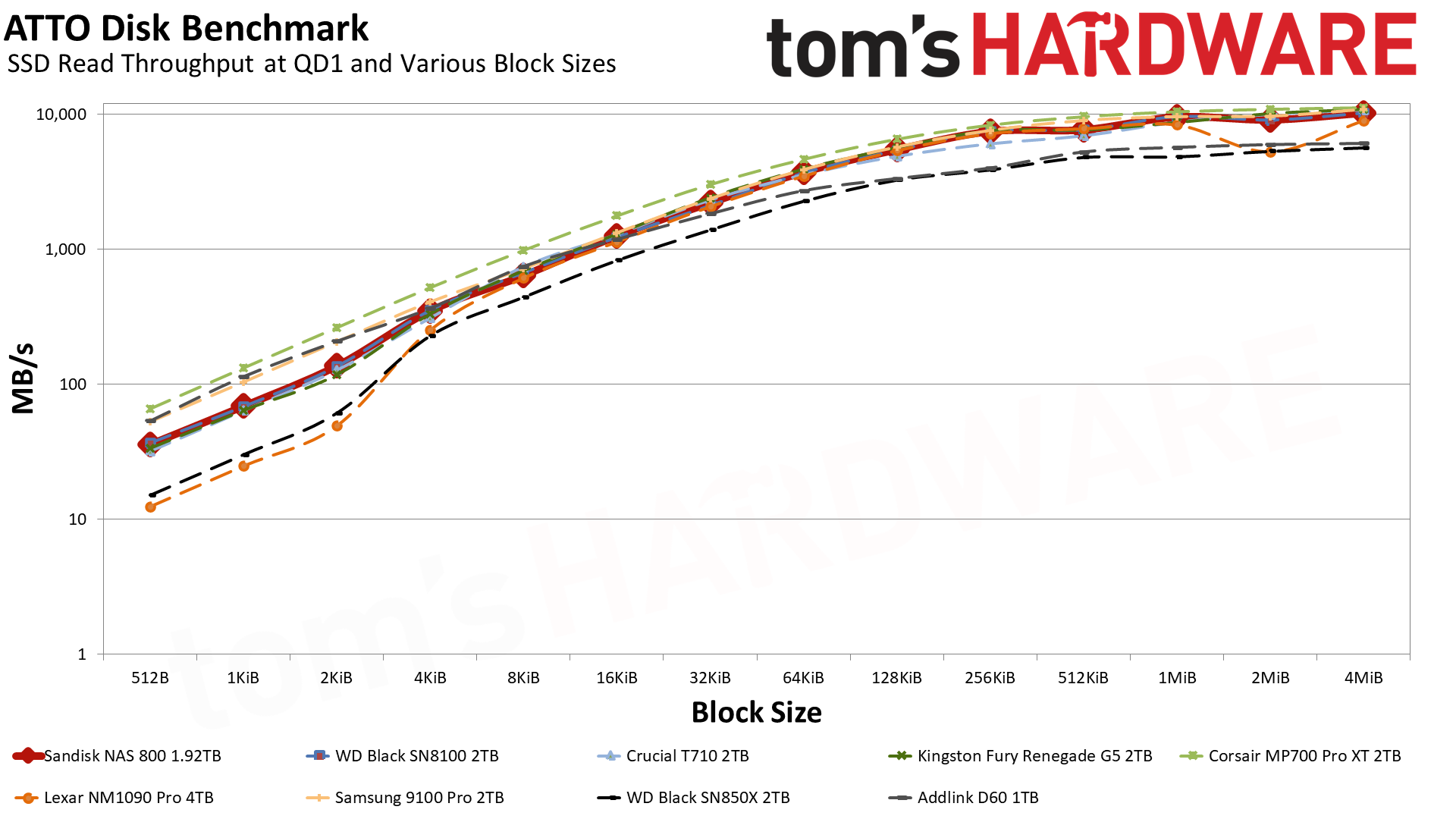
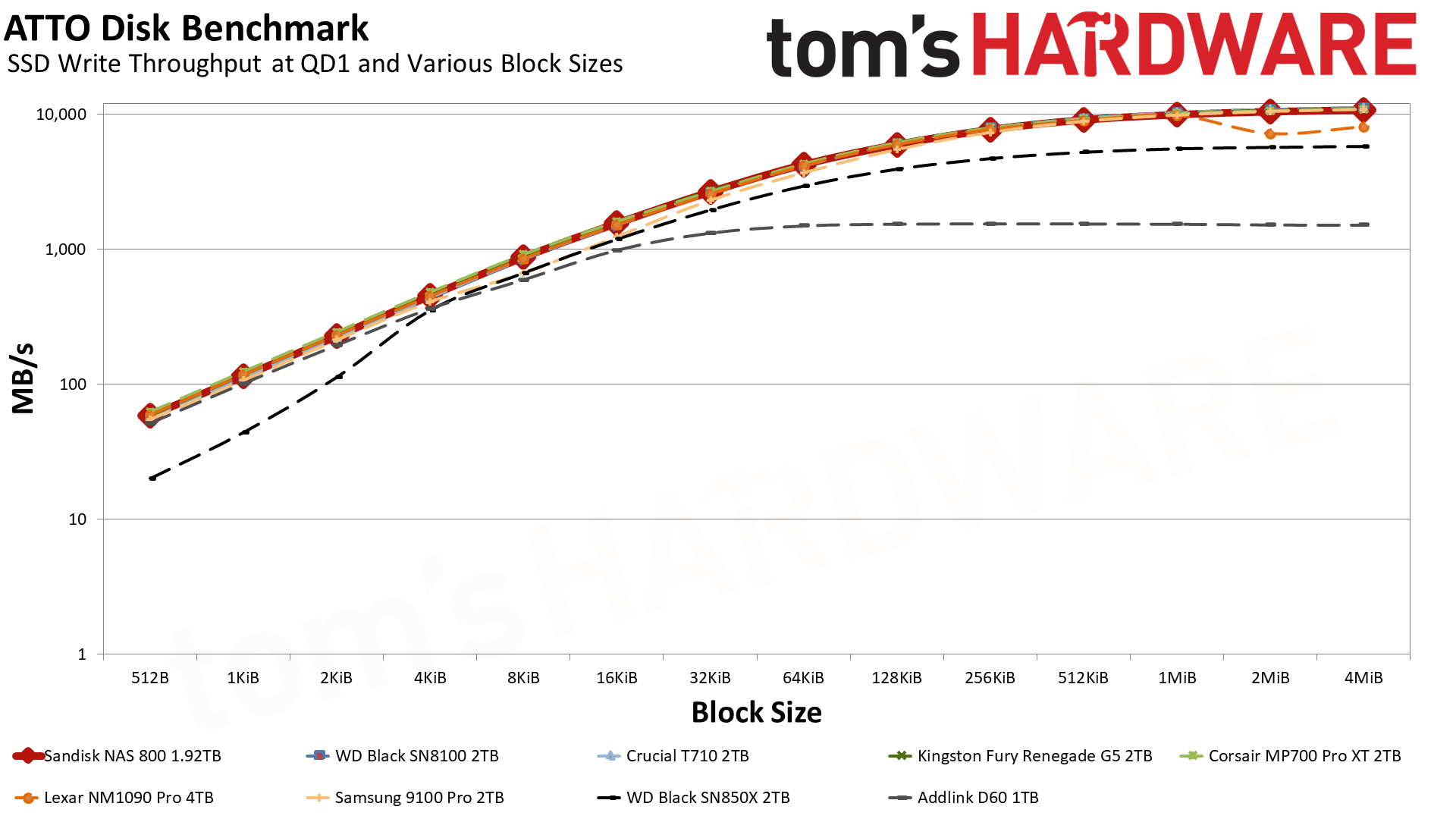
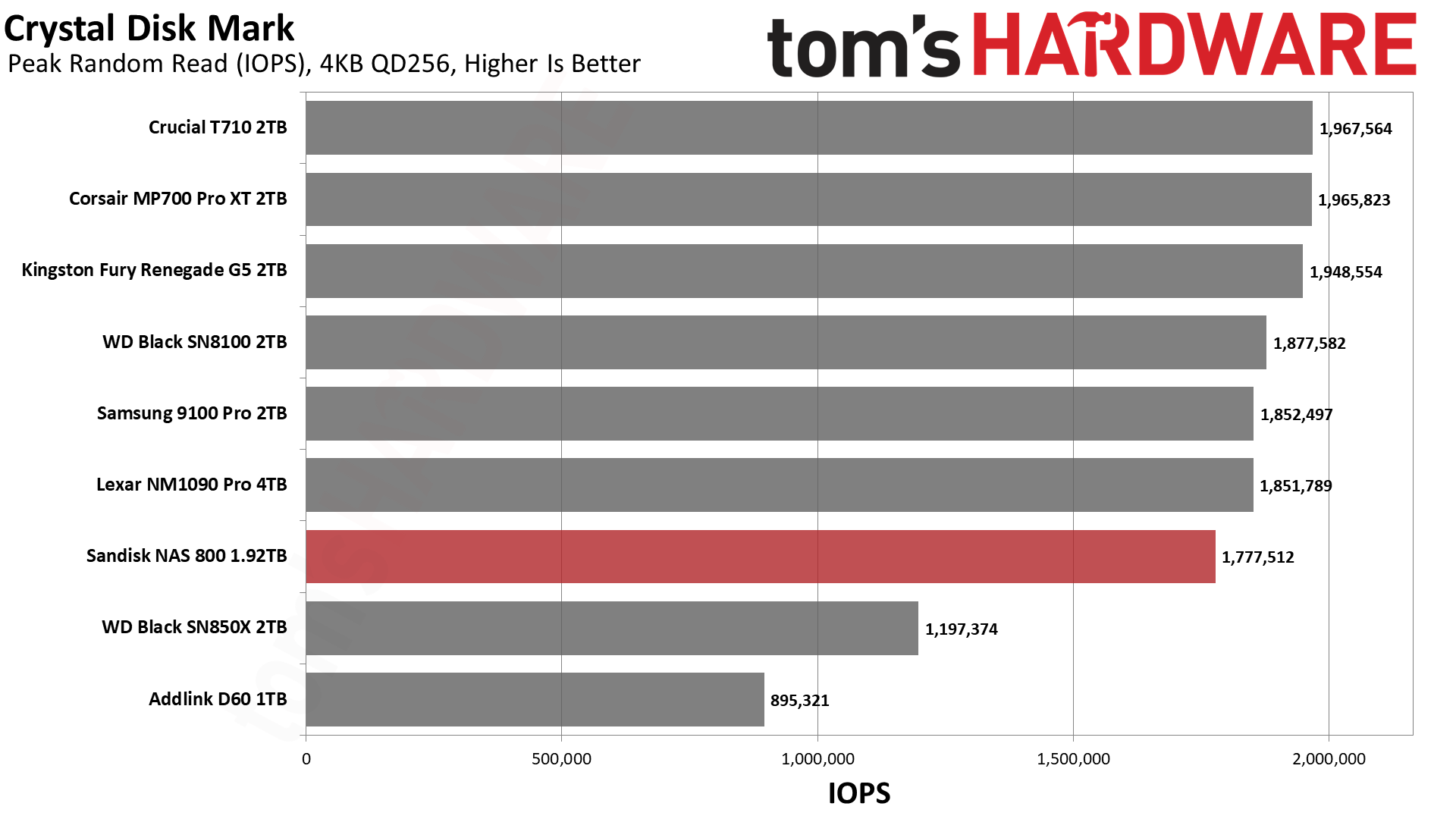
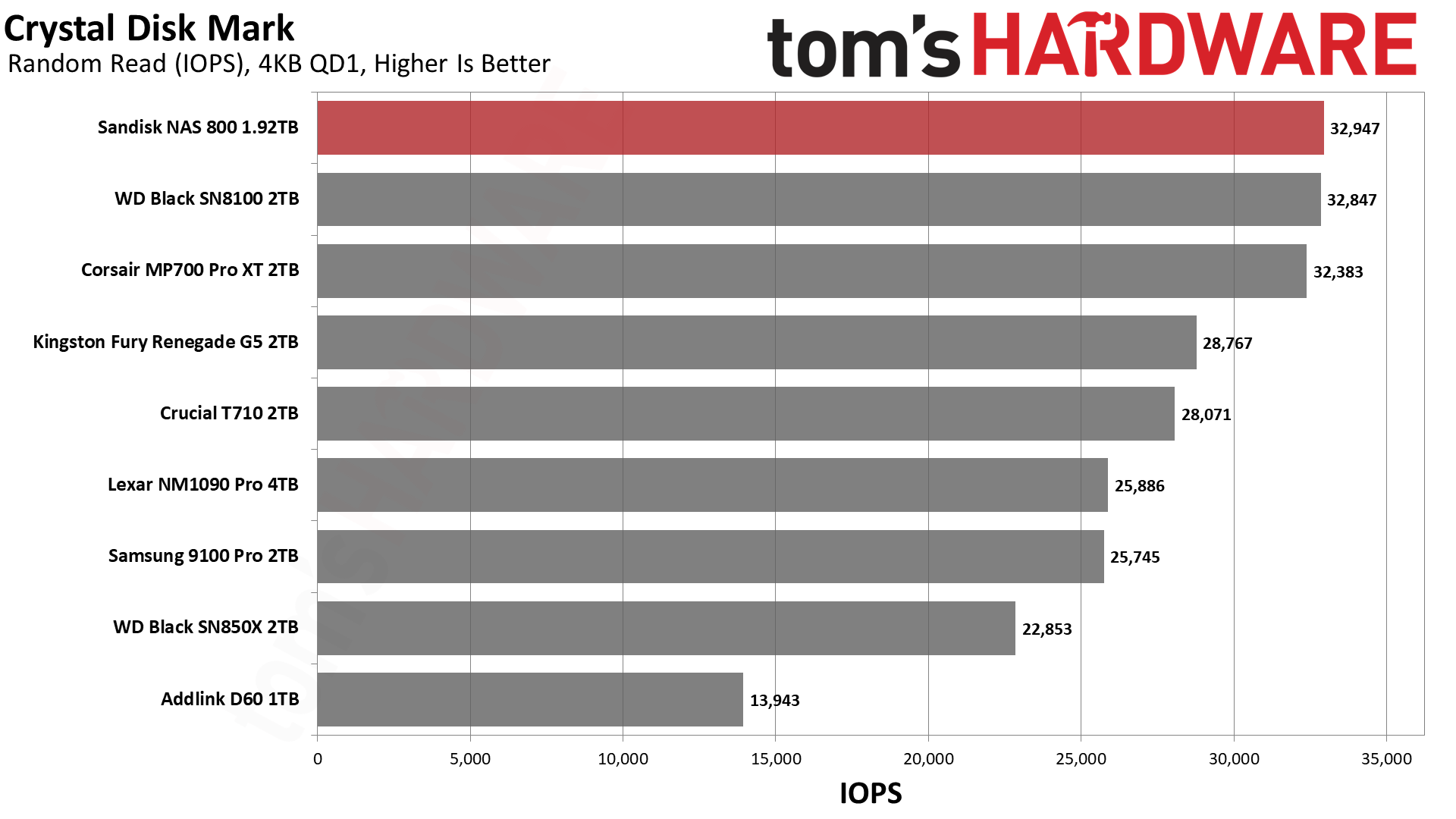
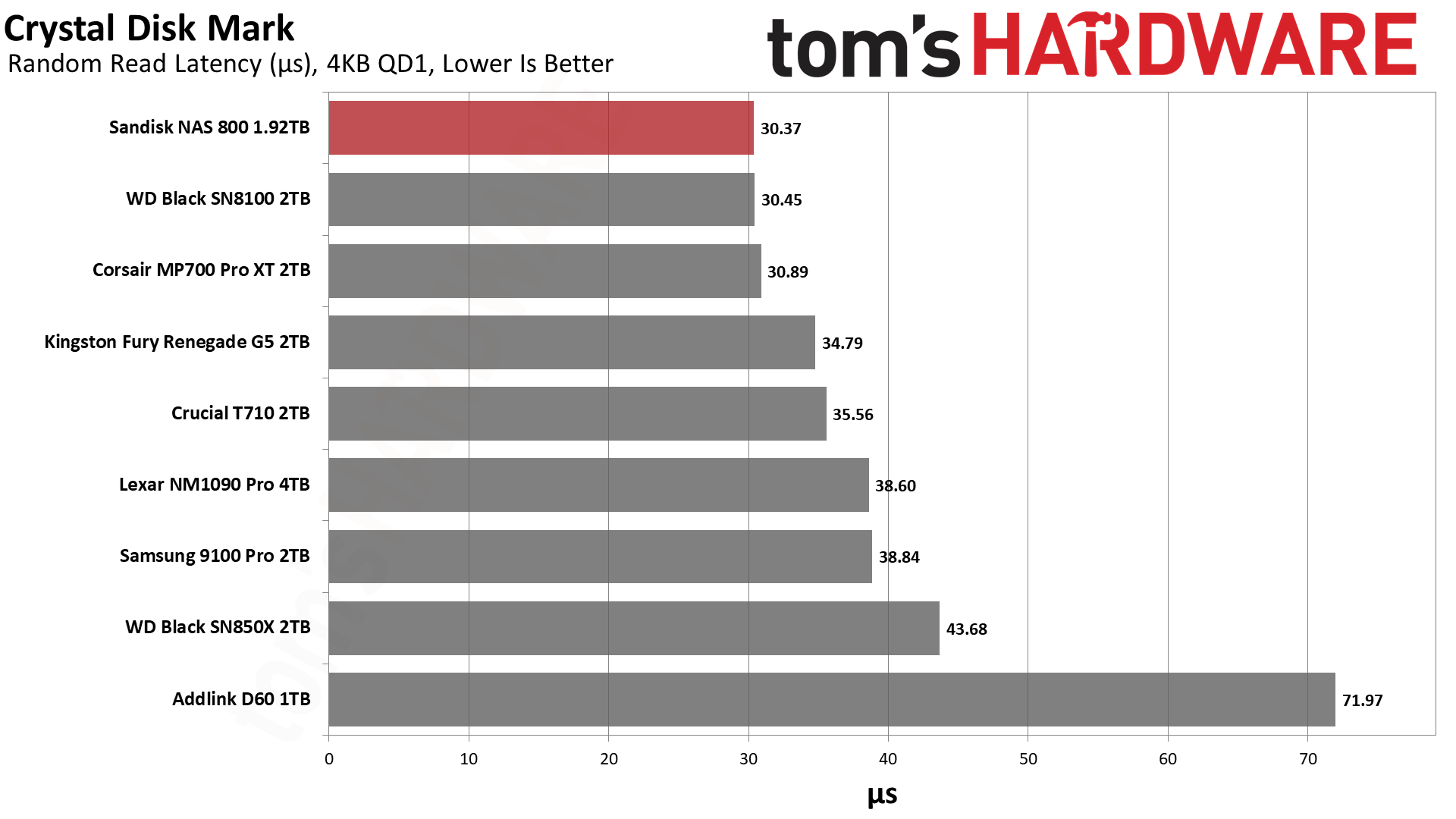
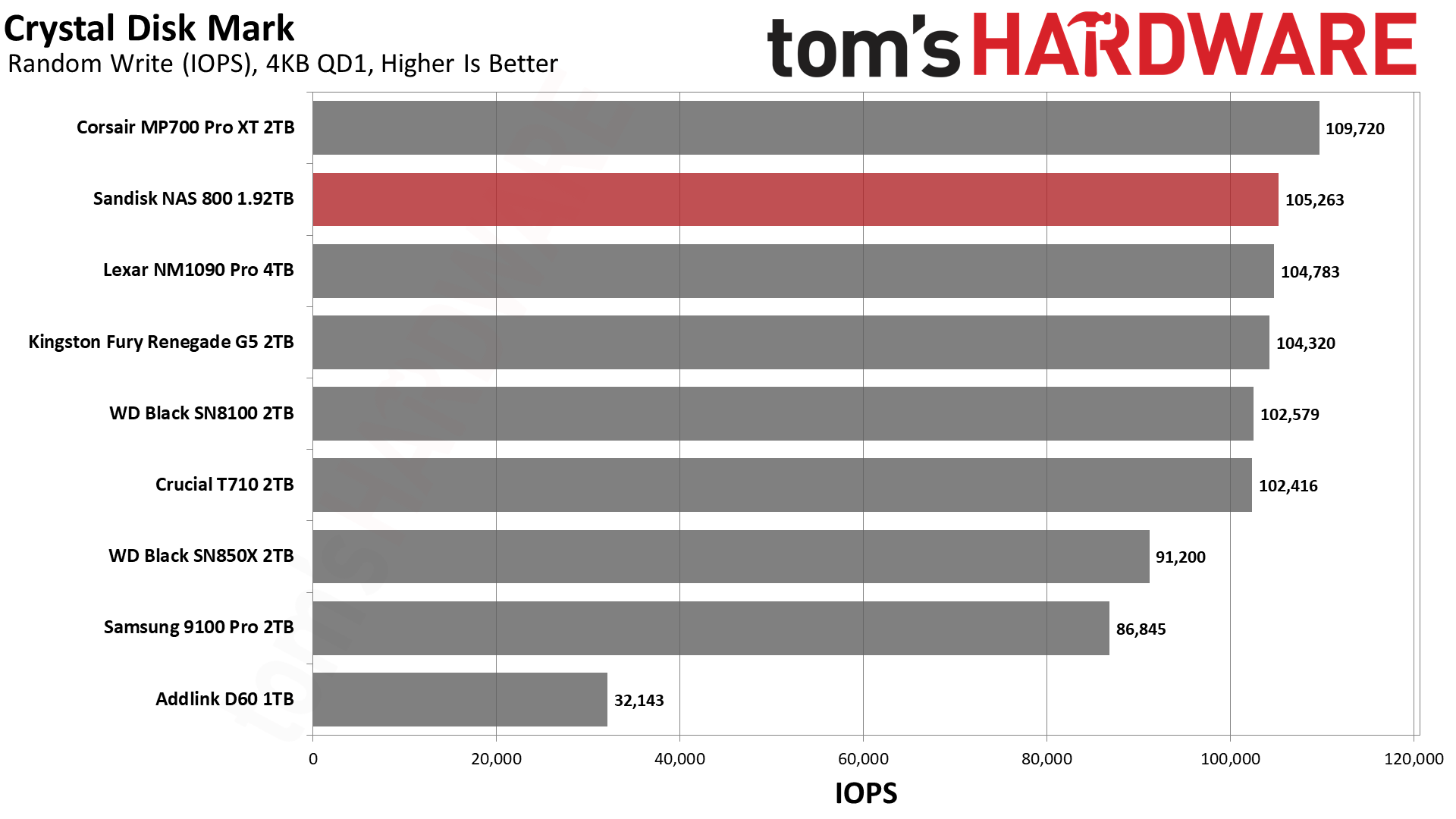
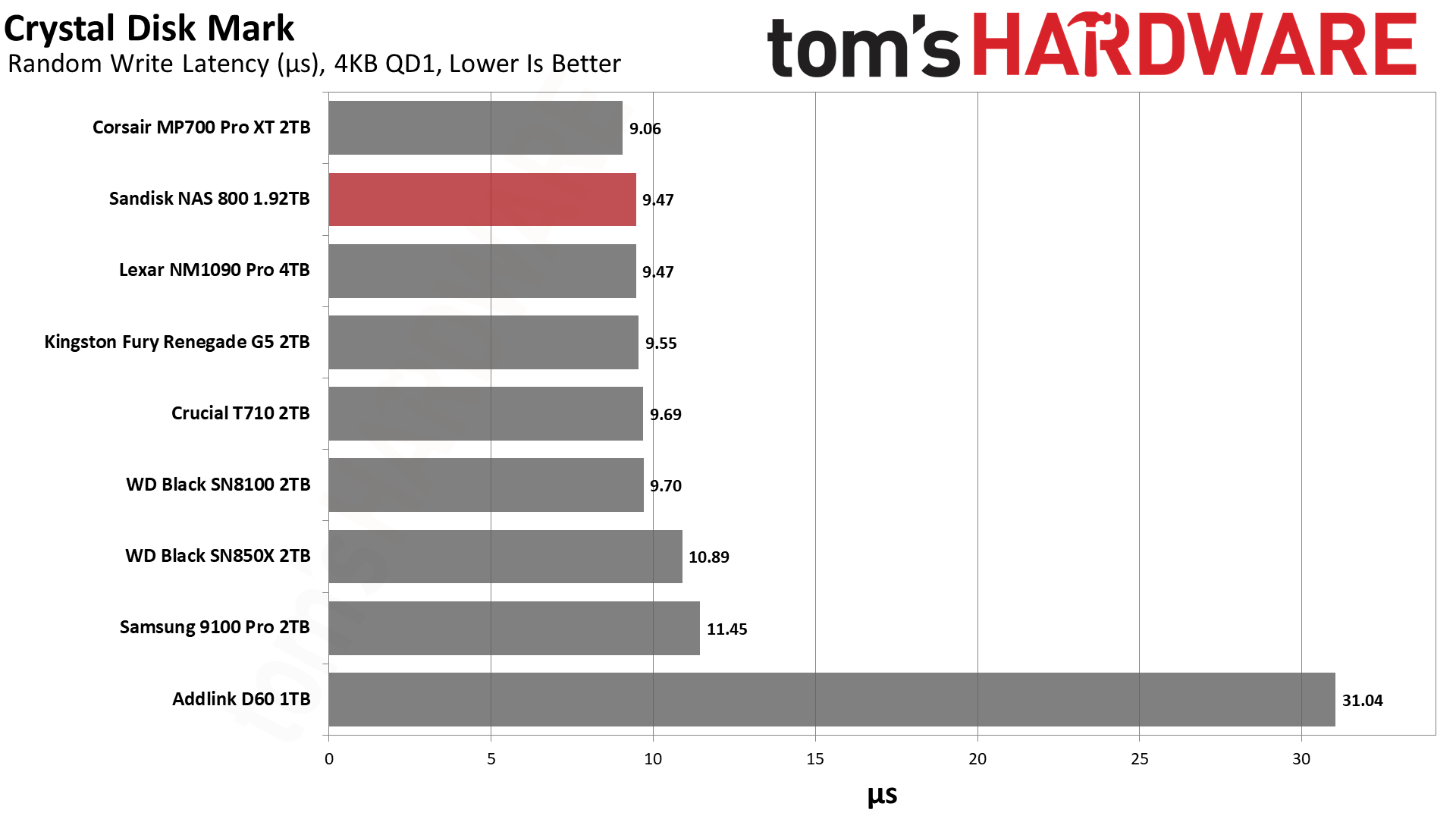
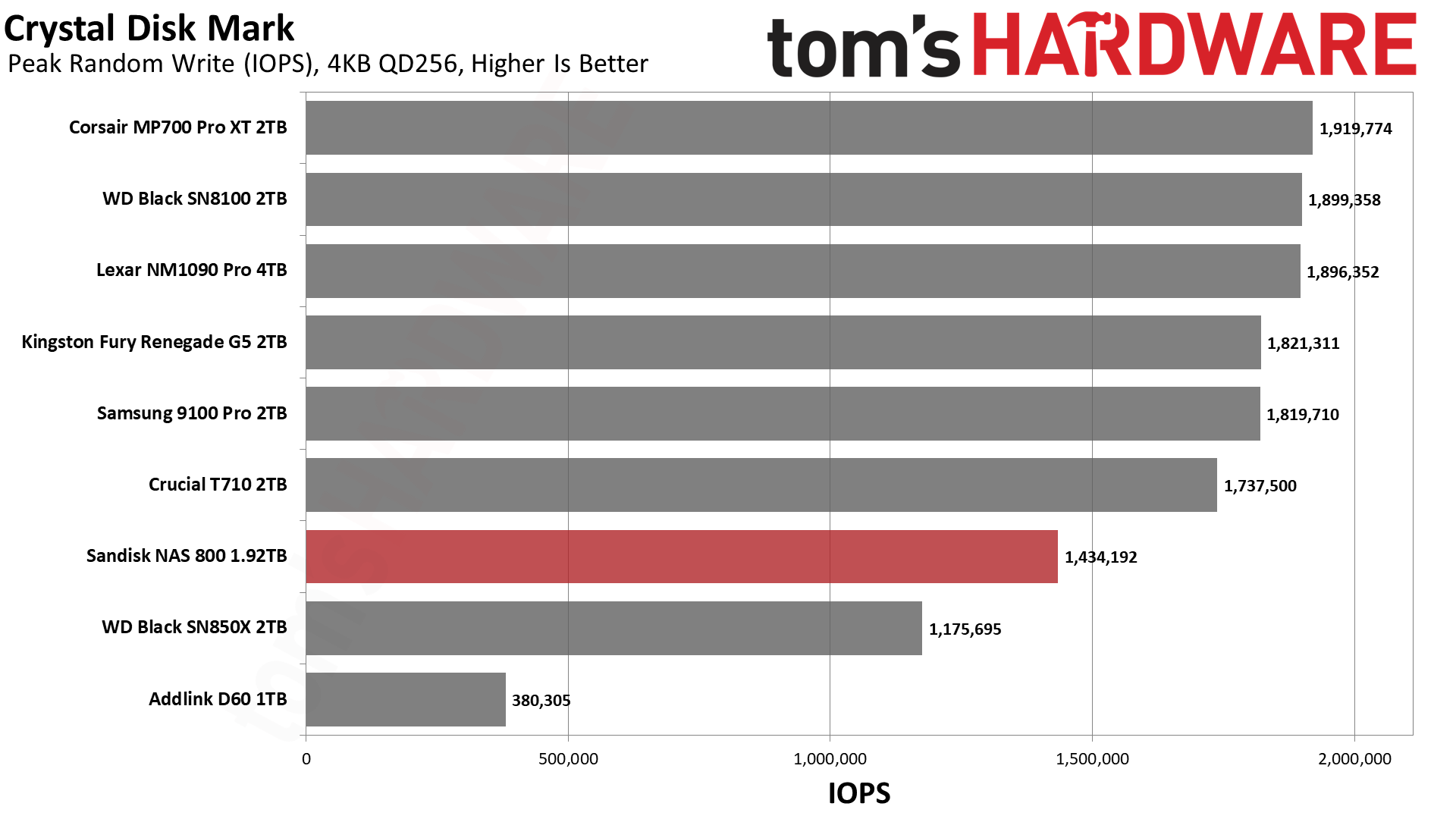
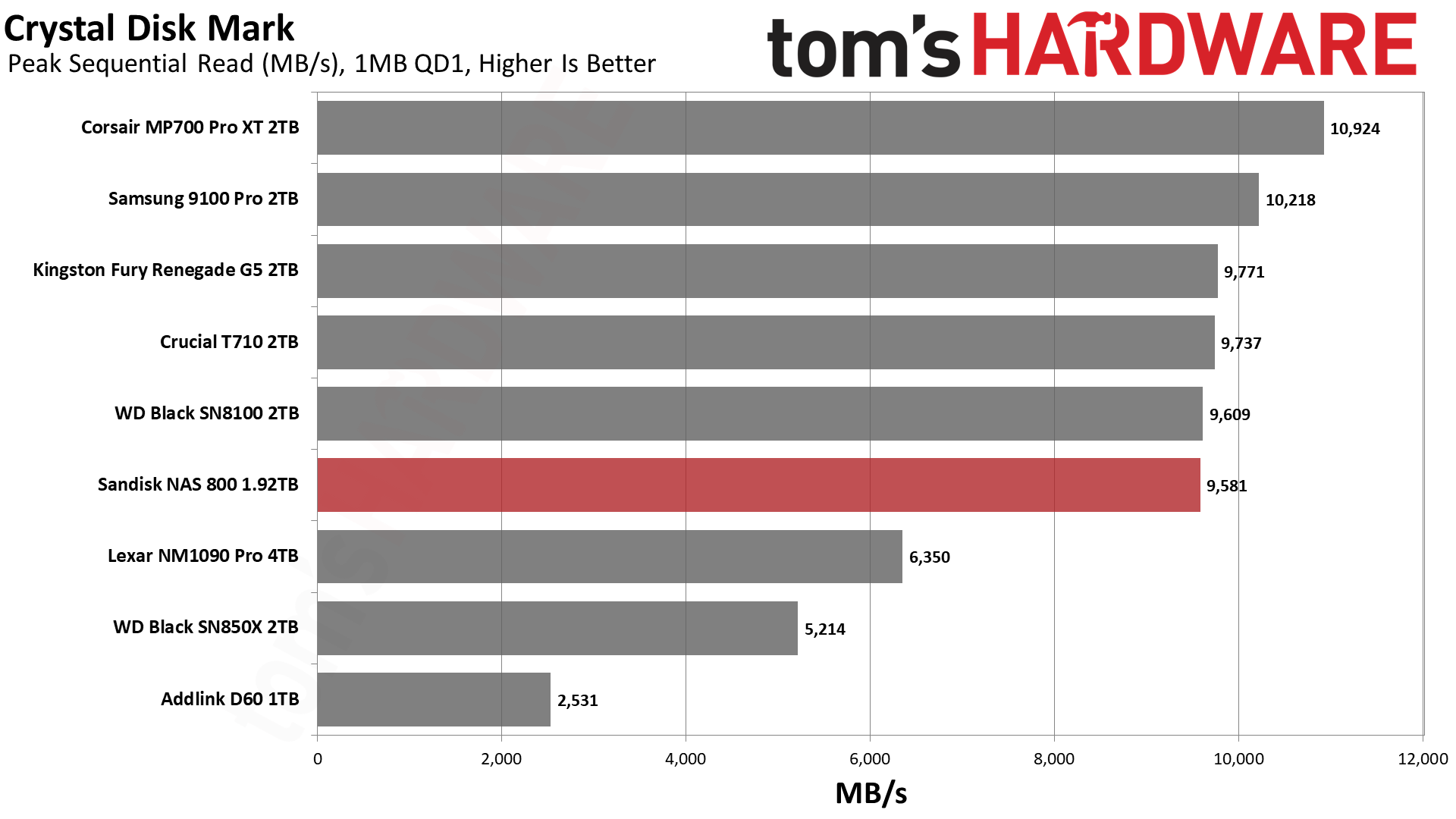
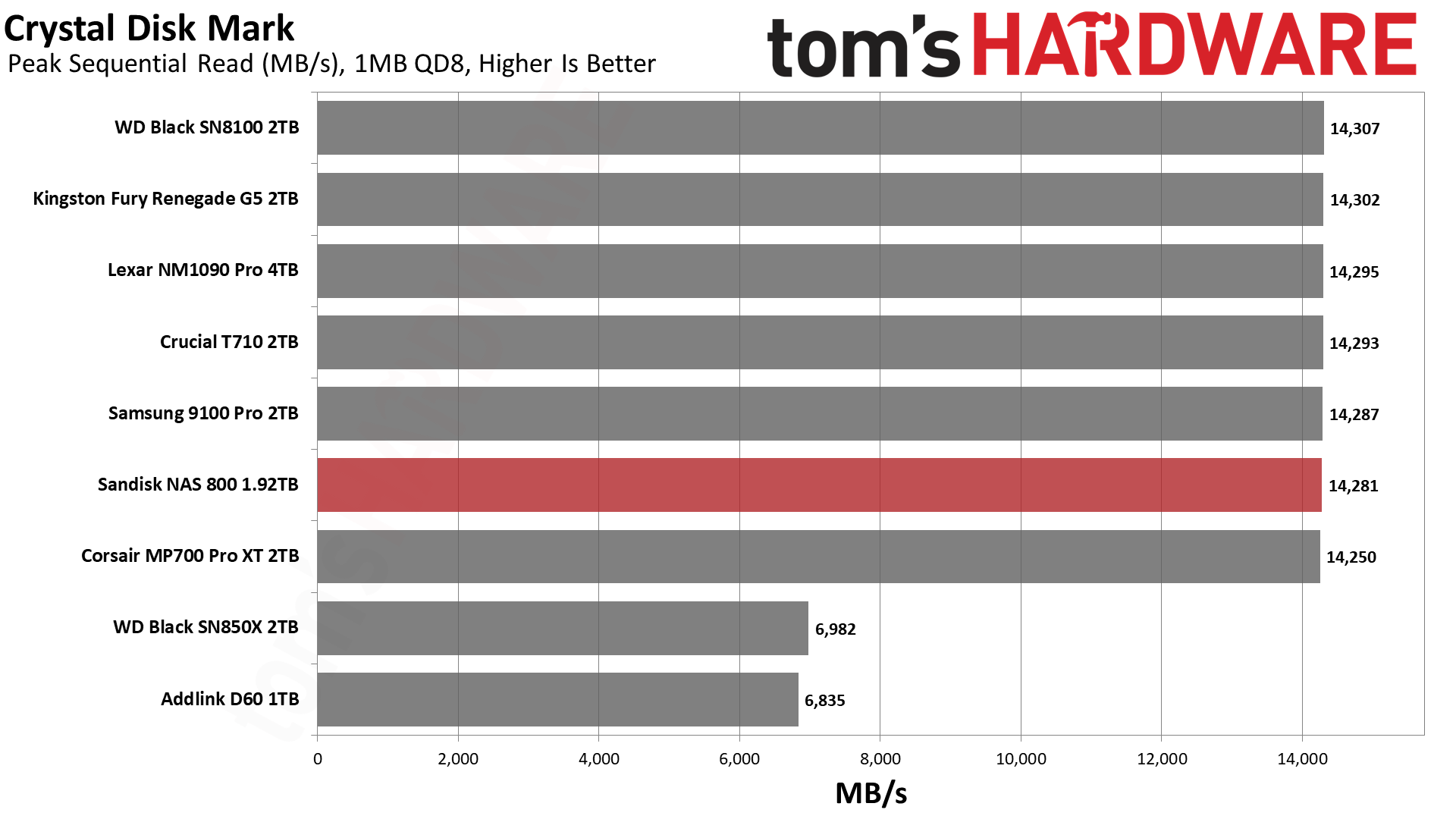
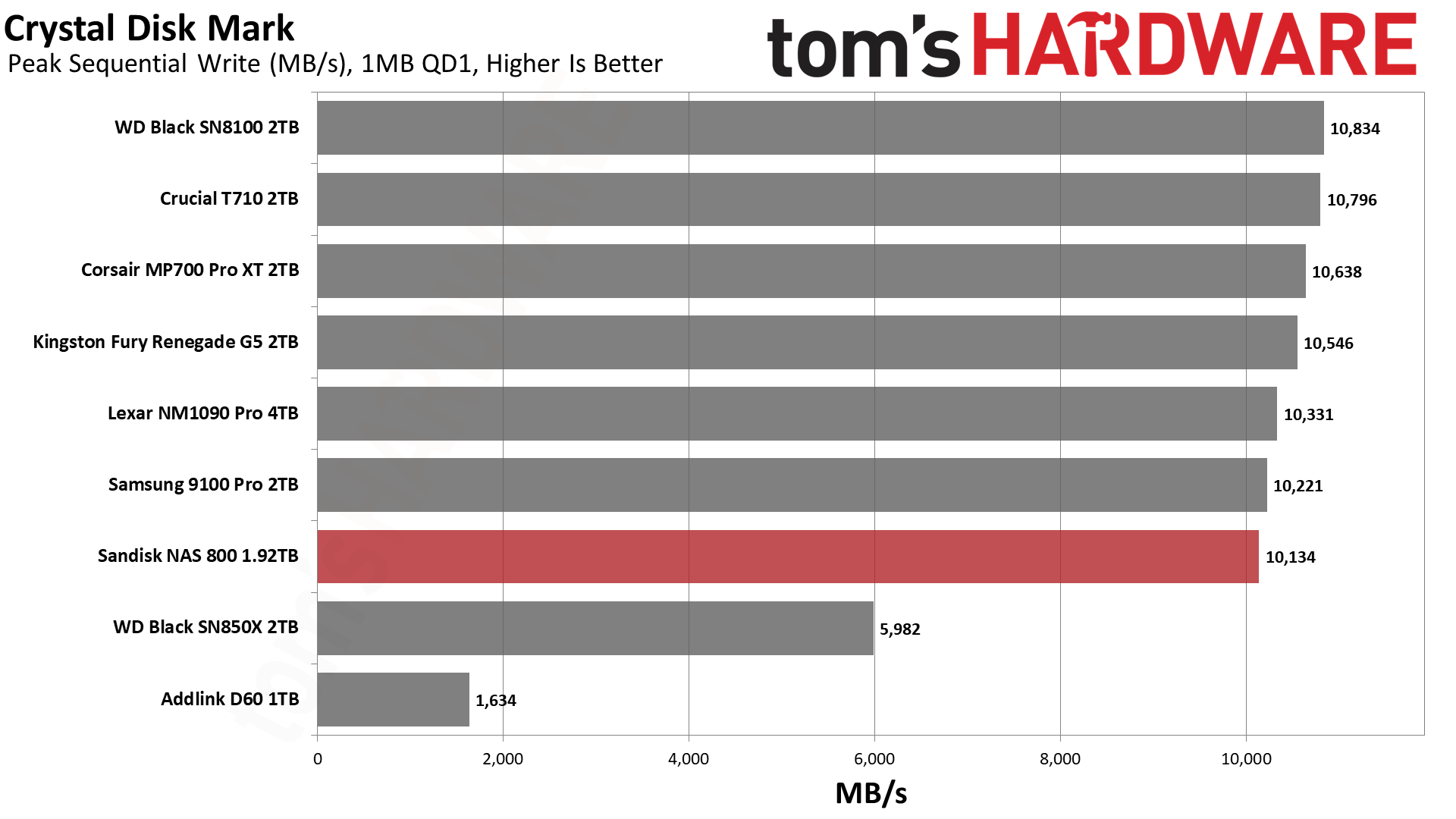
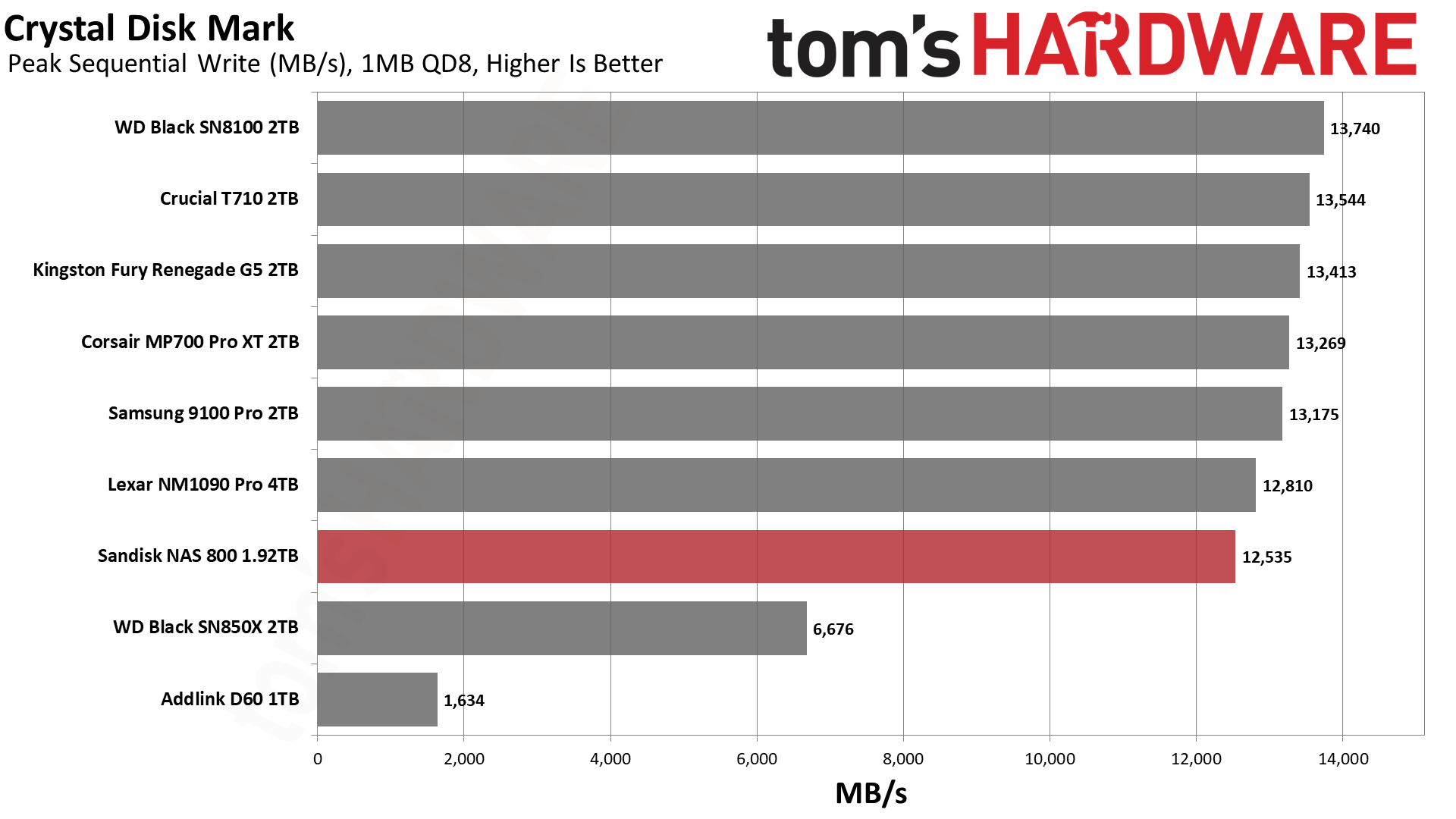
The NAS 800 does quite well in ATTO and CDM where it matters. Its performance in ATTO is as expected, tracking the curve of the similar Black SN8100, and quite good on the whole. Write performance in particular is consistent.
In CDM, the drive is top in random read latency and nearly the top in random write latency. These are great numbers, and the drive is exceptionally responsive with 4KB low-queue-depth operations. Sequential performance is rougher but not terrible. Once queue depth gets up there (QD8), sequential read performance is effectively identical to the very fastest drives available. Sequential write performance is weaker, although we expect that to some degree on a drive optimized more for sustained writes. For internal transfers between very fast drives, this can be a factor, but the extra write endurance is a solid trade-off.
Sustained Write Performance and Cache Recovery
Official write specifications are only part of the performance picture. Most SSDs implement a write cache, which is a fast area of pseudo-SLC (single-bit) programmed flash that absorbs incoming data. Sustained write speeds can suffer tremendously once the workload spills outside of the cache and into the "native" TLC (three-bit) or QLC (four-bit) flash. Performance can suffer even more if the drive is forced to fold, the process of migrating data out of the cache in order to free up space for further incoming data.
We use Iometer to hammer the SSD with sequential writes for 15 minutes to measure both the size of the write cache and performance after the cache is saturated. We also monitor cache recovery via multiple idle rounds. This process shows the performance of the drive in various states including the steady state write performance.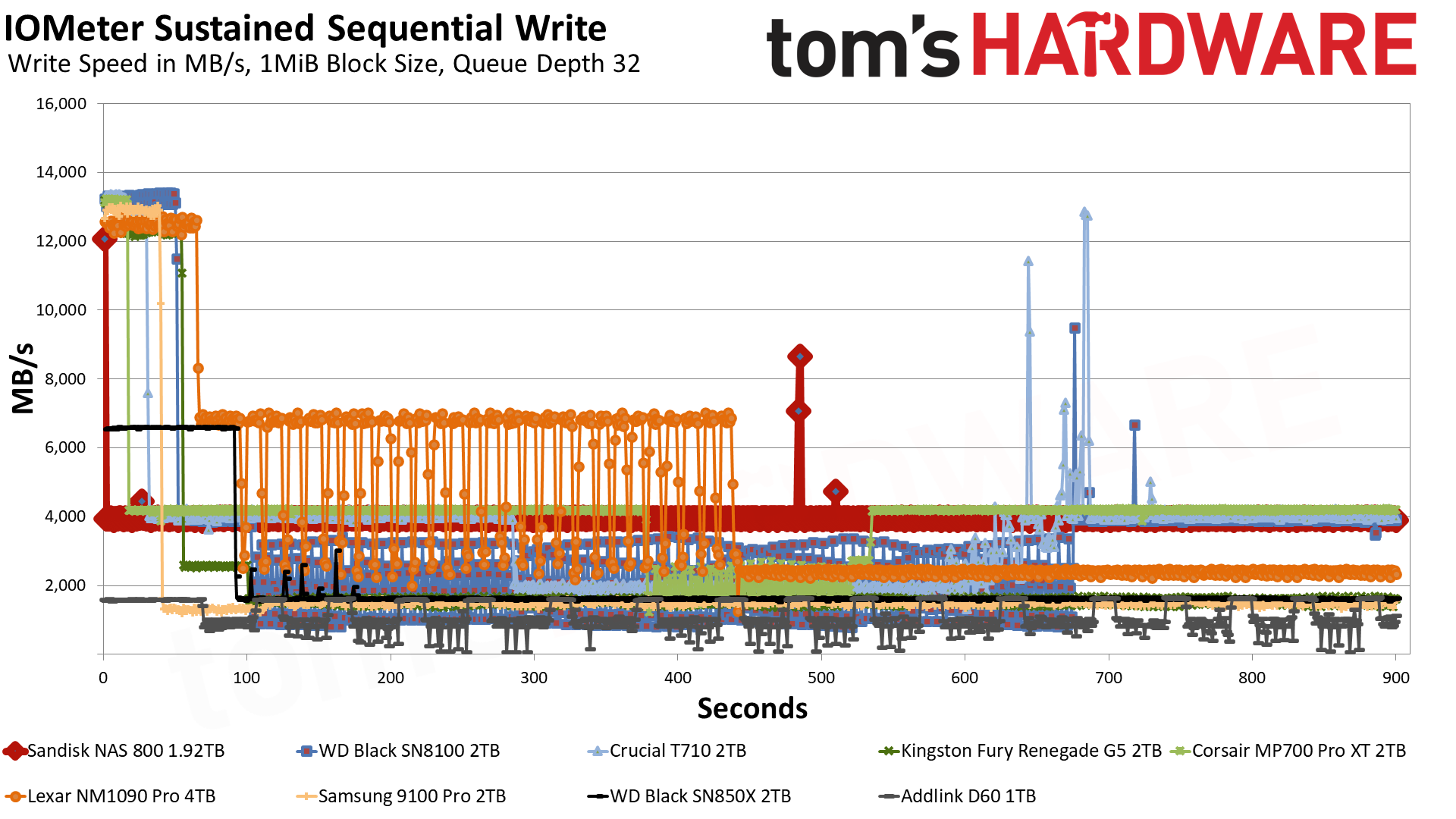
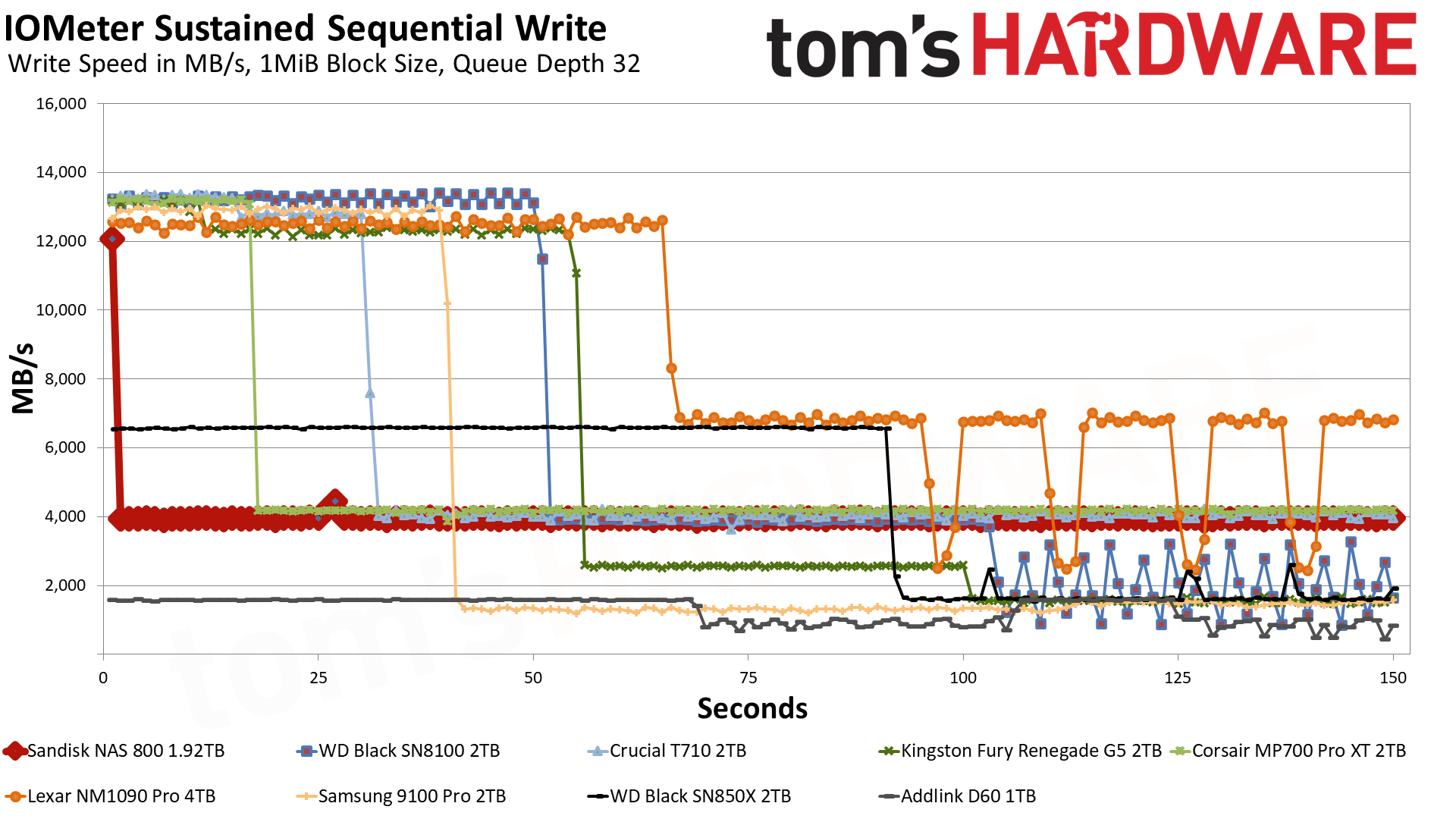
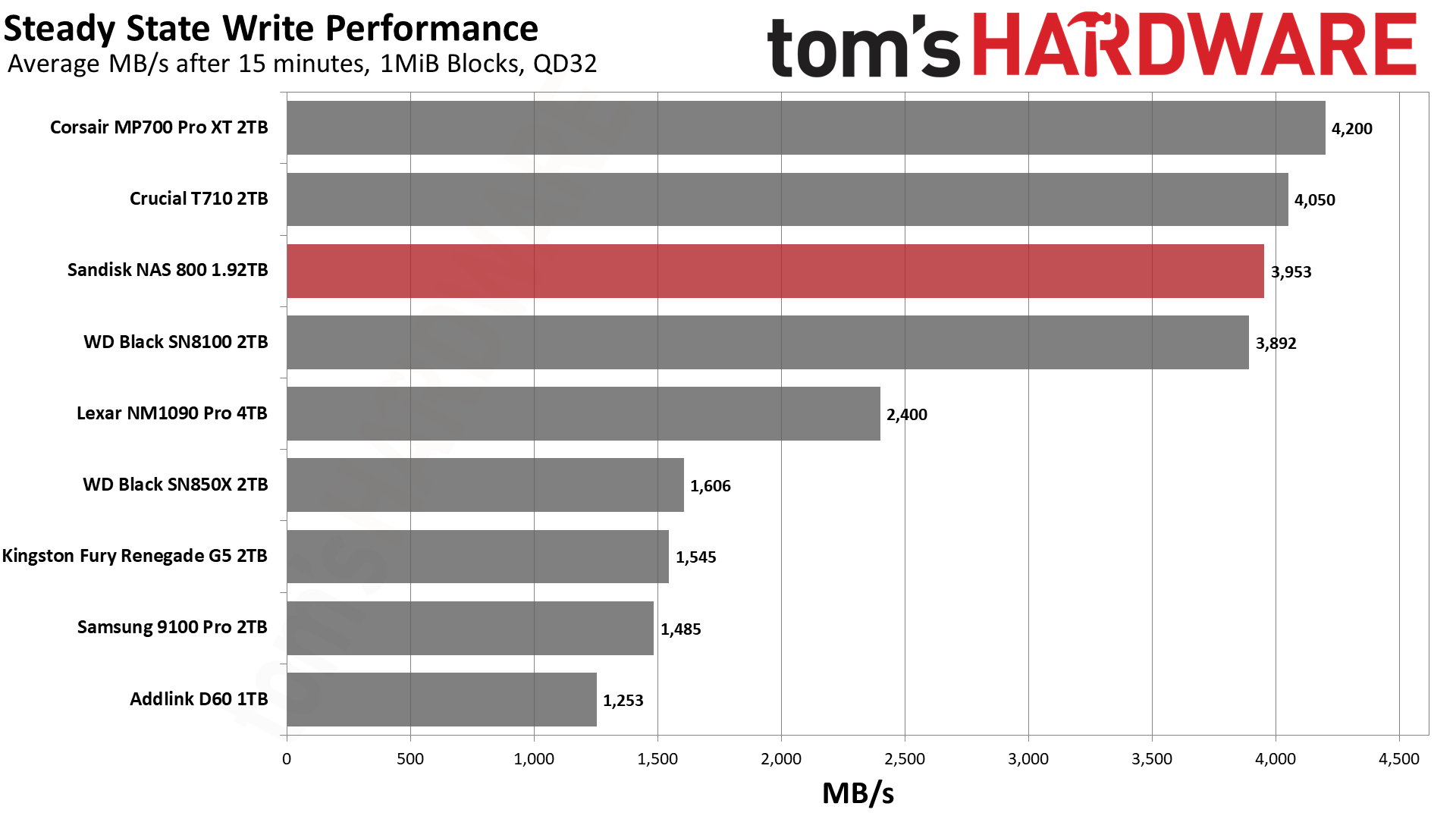
The NAS 800 writes a bit differently than most other drives we’ve tested. It’s only pushing 12 GB/s for about a second in the pSLC mode, and then it drops to just below 4 GB/s for the direct-to-TLC mode. This indicates that the cache is likely static, that is, always available and in a usually high-endurance region. We’ve tested consumer drives with this setup in the past, like the original WD Black and the WD Black SN750. These drives were actually great for NAS. However, over time, it became clear that consumer workloads are bursty and prefer large, dynamic caches. Sandisk and Samsung use hybrid caches these days for the best of both worlds.
While small, a static cache can be useful for higher endurance, and it still handles many random writes just fine. As the cache comes from the base flash, its size is limited. The NAS 800 already has extra overprovisioning to increase its endurance, just as many enterprise drives have, which potentially limits the size of this cache even more. Typically, you would have about 24GB of static cache for 2TB and about 12GB for 1TB, give or take, so our guess is Sandisk is balancing all of this for endurance with the extra overprovisioning.
We find this to be a good trade-off, as 12GB is still quite a lot if you’re juggling smaller random writes. Those get handled by the pSLC cache, which likely has very high endurance, and then they are combined for low write amplification to the native TLC flash, or discarded if the writes aren’t kept. The static cache and native flash may have separate wear zones, which, in summary, means the cache arrangement can help support higher overall drive endurance.
Another big bonus of the small cache is that post-cache performance is high and consistent. At about 4 GB/s, it’s very fast for consumer-grade hardware, and this drive held that pace for a full hour in our testing. That’s a big selling point, and 4 GB/s is more than enough for 10GbE links. Internally, this can keep up with pretty much any Gen 4 drive in the long term. If arranged in an array, this level of performance is high enough for workstation and even some enterprise-level workloads. The T710 and MP700 Pro XT look faster on paper but are not as consistent.
Power Consumption and Temperature
We use the Quarch HD Programmable Power Module to gain a deeper understanding of power characteristics. Idle power consumption is an important aspect to consider, especially if you're looking for a laptop upgrade as even the best ultrabooks can have mediocre stock storage in terms of capacity and performance. Desktops are often more performance-oriented with less support for power-saving features so we show the worst-case for idle.
Some SSDs can consume watts of power at idle while better-suited ones sip just milliwatts. Average workload power consumption and max consumption are two other aspects of power consumption but performance-per-watt, or efficiency, is more important. A drive might consume more power during any given workload but accomplishing a task faster allows the drive to drop into an idle state more quickly, ultimately saving energy.
For temperature recording we currently poll the drive’s primary composite sensor during testing with a ~22°C ambient. Our testing is rigorous enough to heat the drive to a realistic ceiling temperature but real-world temperatures will vary due to the environment and workload factors.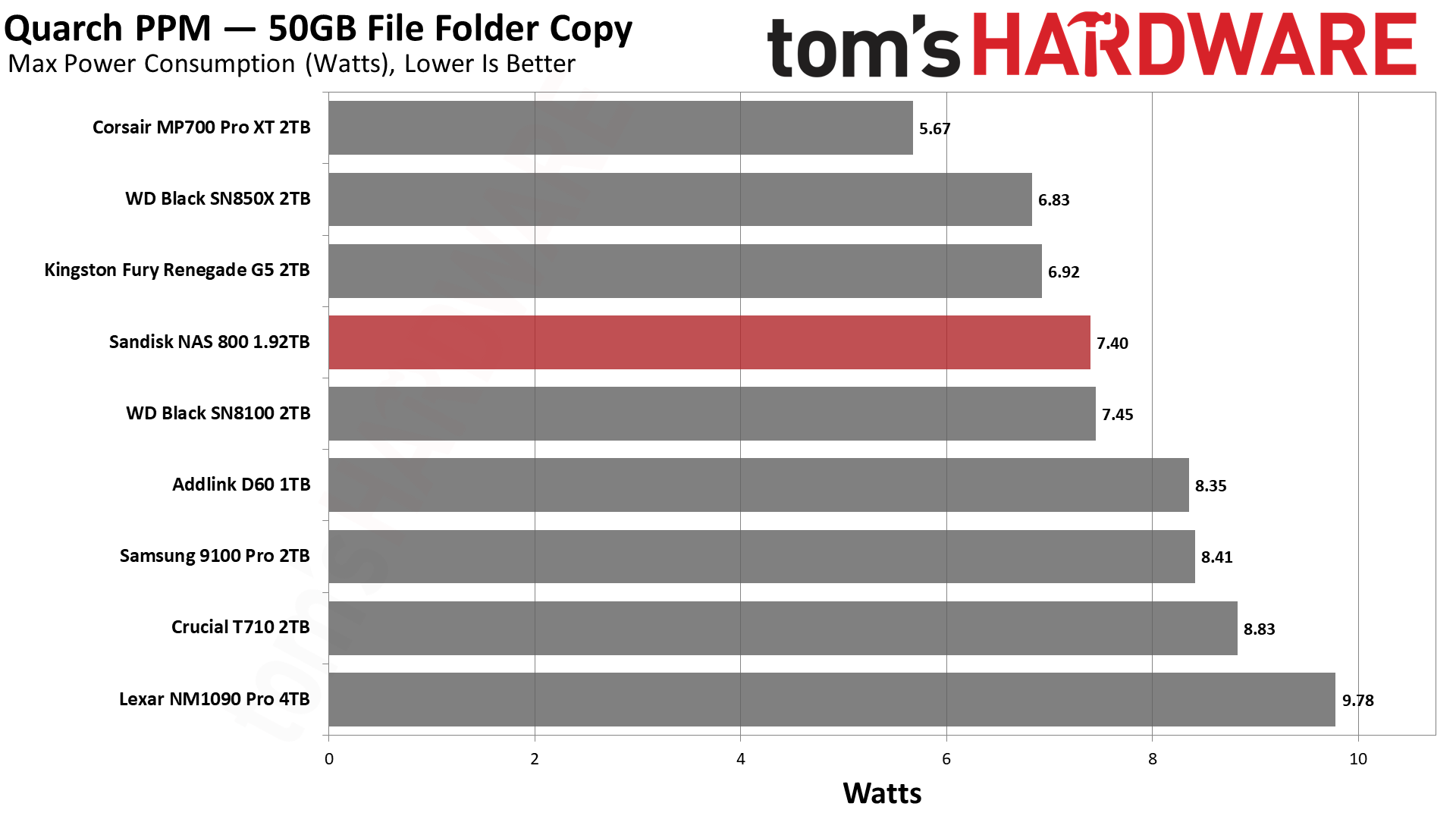
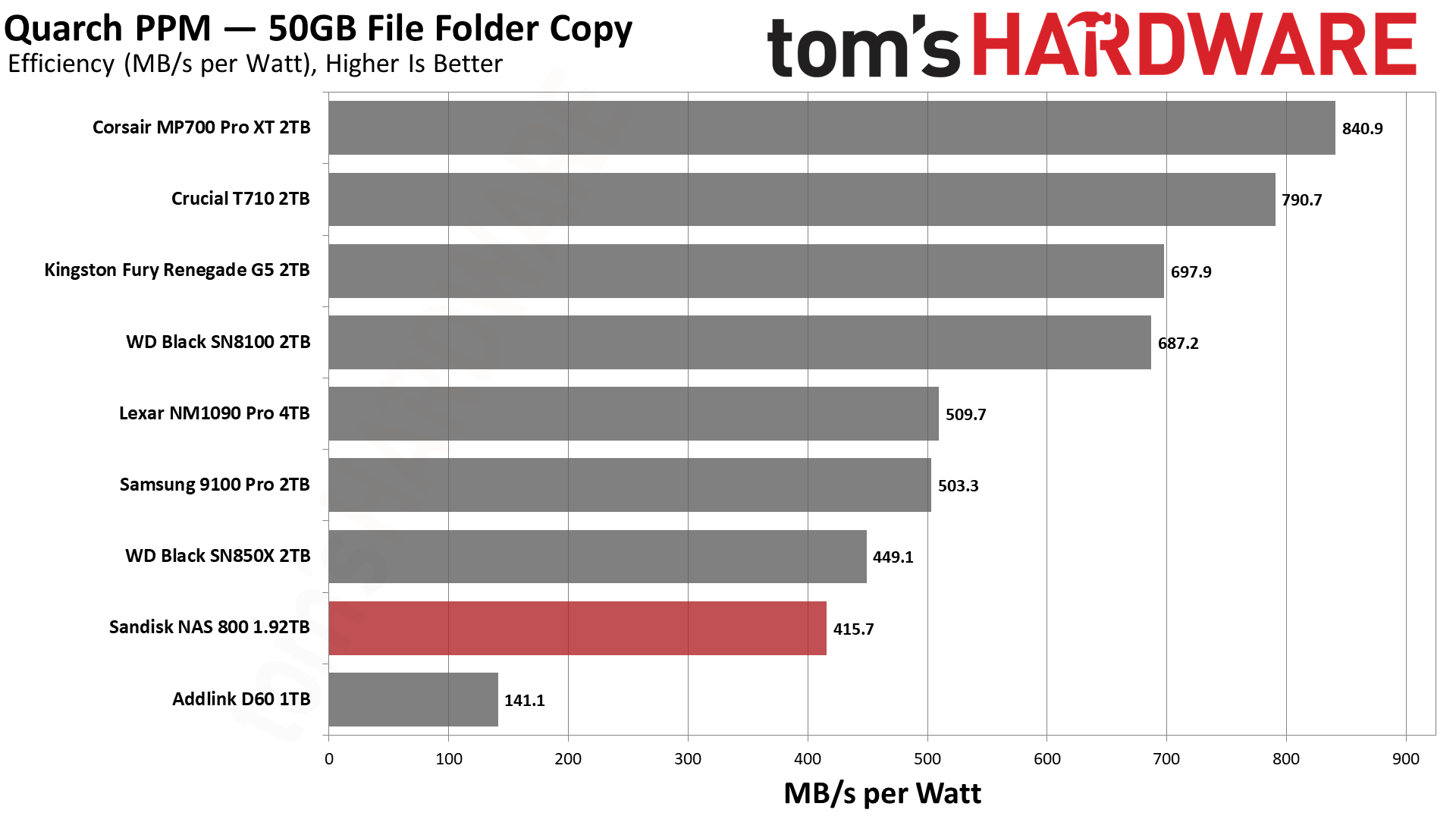
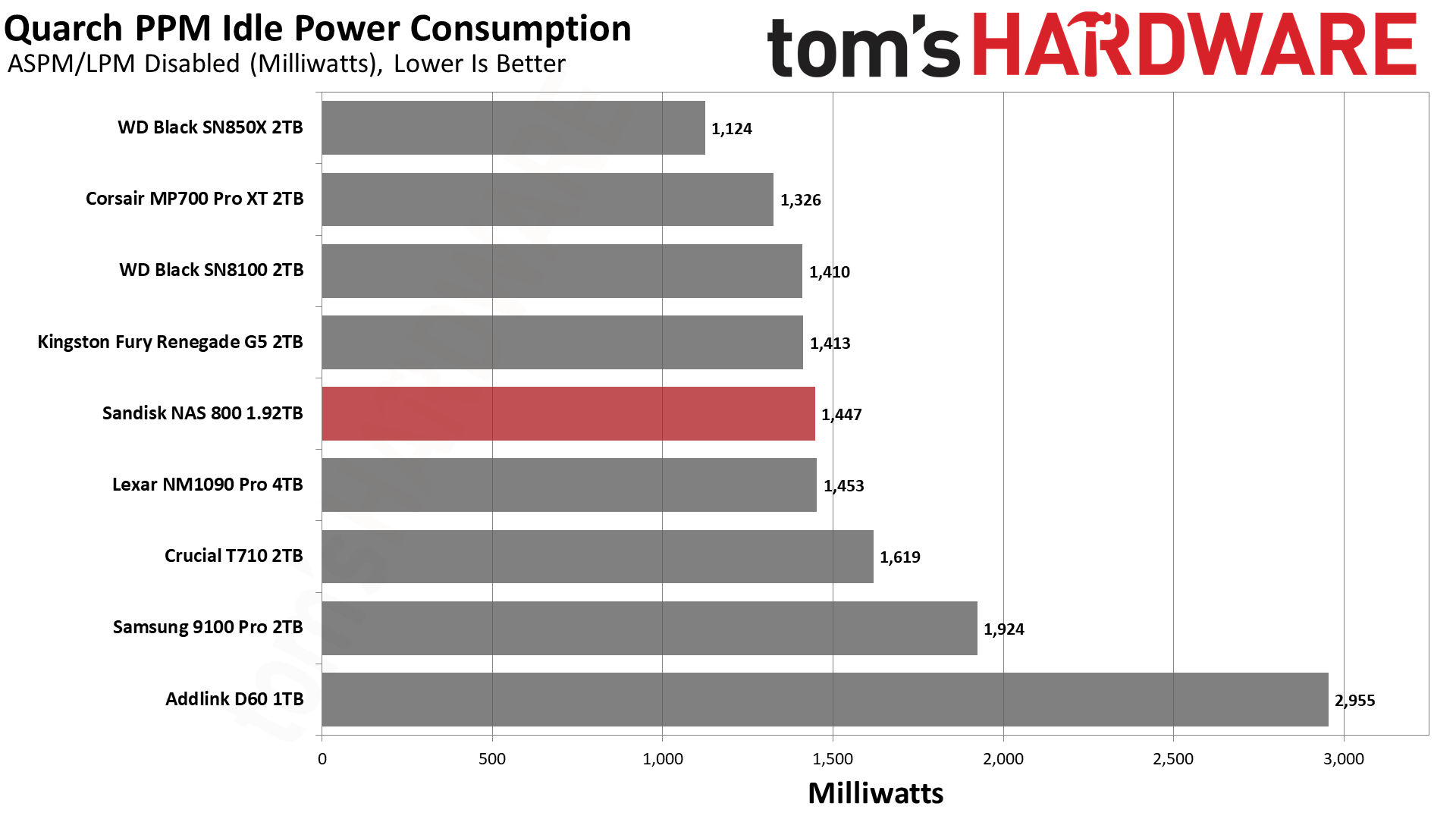
The NAS 800 is not terribly efficient by Gen 5 standards, or even Gen 4, coming in under the Black SN850X. This is OK and explained by the fact that the drive has a very small pSLC cache. TLC flash is not as performant, so it does less work. Less power is used, but multi-bit programming is less efficient. When placed next to the D60, it becomes clear that the NAS 800’s results aren’t so bad, although the D60 has power-loss protection hardware, which can affect power consumption.
As we said, TLC can mean less power, so this lower level of efficiency does not translate to higher heat production. The drive hit a peak reading below 70 degrees Celsius in our testing, and as the drive is optimized for sustained writes, our type of testing is more relevant than usual. The drive has about 15 degrees of headroom if this reading correlates to the throttling temperature, which is acceptable to us, although certainly a heatsink is not unwelcome.
Test Bench and Testing Notes
CPU | |
Motherboard | |
Memory | |
Graphics | Intel Iris Xe UHD Graphics 770 |
CPU Cooling | |
Case | |
Power Supply | |
OS Storage | |
Operating System |
We use an Alder Lake platform with most background applications such as indexing, Windows updates, and antivirus disabled in the OS to reduce run-to-run variability. Each SSD is prefilled to 50% capacity and tested as a secondary device. Unless noted, we use active cooling for all SSDs.
Sandisk NAS 800 Bottom Line
The Sandisk NAS 800 is not a drive for everyone. It’s priced too high for that, and its performance distinctly prefers certain workloads. Due to its optimization, it’s also not very power-efficient, so you might not want this in your laptop, either. This is all OK, though, because this drive is great at what it’s made for: NAS workloads.
Its sustained write performance, in particular, is high and consistent. It can also handle all of those writes with its exceptionally high TBW. The base hardware is fantastic in its own right, and there remain hints of that with the drive’s top-tier 4KB QD1 latencies, too. If you have a place for this drive and can afford it, it’s the best retail option out there for NAS.
There are some things the NAS 800 can’t do, though. It lacks power-loss protection hardware, like an array of capacitors. The D60 has these, and it’s one of the few retail options avialable with that feature. The NAS 800 is also not an ultra-low-latency option on par with a pSLC drive, or one with extreme endurance like the PNY LX3030, but that’s moot with no real products like that currently on the market.
We would instead look at two other possibilities: One, you go with a Gen 4 drive, or two, you grab an equivalent Gen 5 drive with a standard caching scheme. One downside for either is that you’re not getting the NAS 800’s high TBW. We also think the caching scheme works well for write-heavy workloads. Performance-wise, a Gen 4 drive could work as an alternative for many NAS applications, but we would highlight the NAS 800’s excellent latency as a counterpoint. If you need bandwidth, then there is not much of a substitute, either.
On the power-efficiency front, the NAS 800’s results are underwhelming, but expected. It would be wrong to take our numbers at face value for a drive that writes mostly in TLC mode. It’s plenty efficient for its intended workload, and the drive did not overheat in our testing.
As such, our biggest gripe is the price. We know what this hardware is, and we can account for the firmware optimization and the pSLC cache. That means you’re paying for the endurance rating. Frankly, we’re OK with that because this is one place you want that level of security. Standard drives often have comically high TBW for what users actually do with them, but this drive might actually see some serious writes over years of regular use. If that sounds like you, then you should definitely give the NAS 800 a serious look.
MORE: Best SSDs
MORE: Best External SSDs
What's Your Reaction?
 Like
0
Like
0
 Dislike
0
Dislike
0
 Love
0
Love
0
 Funny
0
Funny
0
 Angry
0
Angry
0
 Sad
0
Sad
0
 Wow
0
Wow
0